
What is kiosk commerce?
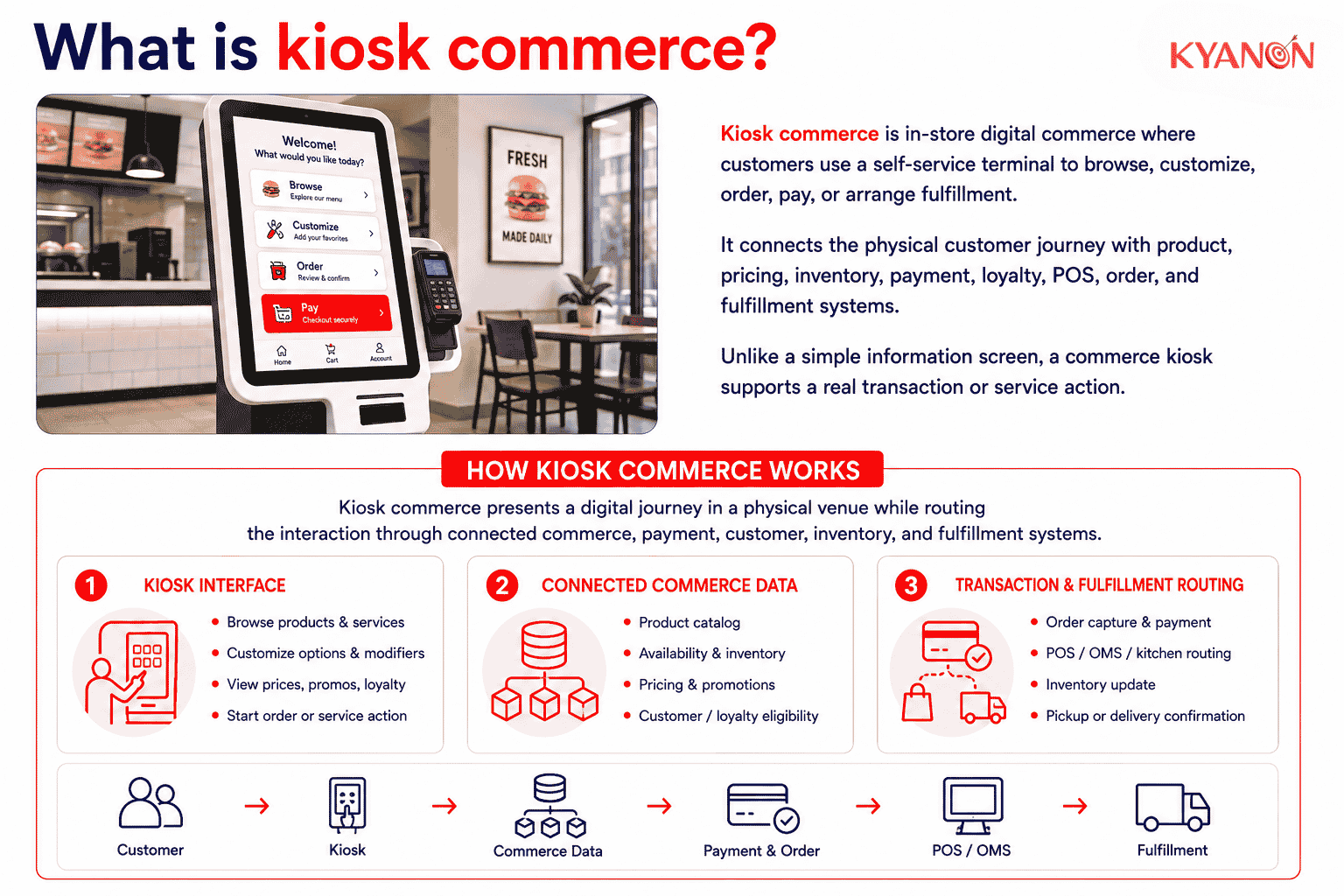
Kiosk commerce is a form of in-store digital commerce in which customers use a self-service terminal to browse, customize, order, pay for, or arrange the fulfillment of products and services. The kiosk connects the physical customer journey with commerce systems such as product catalogs, pricing, inventory, payments, loyalty, point of sale, order management, and fulfillment.
Unlike a standalone information screen, a commerce kiosk supports a transactional or service action. Square similarly defines a self-service kiosk as an interactive terminal through which customers can independently browse, customize, and complete transactions.
How kiosk commerce works
Kiosk commerce works by presenting a digital customer journey inside a physical venue while processing the interaction through commerce, payment, customer, inventory, and fulfillment systems.
A customer selects products or services through the kiosk interface. The system can retrieve current product information, prices, modifiers, promotions, loyalty eligibility, and availability. Once the transaction is confirmed, order and payment data is routed to the relevant POS, order management, kitchen, inventory, or fulfillment system.
The kiosk therefore works best as another connected commerce channel rather than as an isolated device.
Common types of kiosk commerce
Kiosk commerce can support different stages of the physical customer journey, from product discovery and ordering to payment and fulfillment.
| Type |
Primary use |
|
Self-ordering kiosk |
Lets customers browse menus or catalogs, customize products, place orders, and pay without staff entering the order. |
| Self-checkout kiosk |
Allows customers to identify physical products and complete checkout and payment independently. |
|
Product discovery kiosk |
Provides detailed product information, comparisons, availability, or guided product selection. |
| Endless-aisle kiosk |
Gives customers access to products or variants not physically stocked at the location and routes orders for pickup or delivery. |
|
Service and fulfillment kiosk |
Supports activities such as ticketing, loyalty identification, order lookup, click-and-collect check-in, or appointment registration. |
Square’s commercial kiosk implementation demonstrates the self-ordering model: customers can select products and complete checkout directly through the terminal with integrated payment capabilities.
The appropriate kiosk model depends on which part of the physical journey benefits from self-service or access to a wider digital commerce capability.
Customer interface and journey
The interface controls how customers discover products, configure an order, identify themselves, apply promotions, pay, and select fulfillment options.
Kiosk UX should account for the conditions of the physical environment, including queue pressure, screen position, navigation depth, accessibility, language, session timing, and access to staff assistance.
For retail and F&B businesses, the relevant performance question is not simply whether customers use the kiosk, but whether they can complete the intended journey accurately and with limited unnecessary intervention.
Commerce and integration layer
The commerce layer applies product, pricing, promotion, loyalty, inventory, tax, payment, and fulfillment rules to the kiosk transaction.
APIs or middleware may connect the kiosk with systems including:
- POS
- ERP
- CRM
- loyalty platforms
- inventory systems
- Order Management Systems
- payment services
- kitchen display systems
- analytics platforms
Integration determines whether kiosk transactions become part of the same commerce environment as web, mobile, staffed checkout, and other channels.
For example, Kyanon Digital’s omnichannel commerce capability includes custom middleware connecting eCommerce experiences with POS, ERP, CRM, and inventory systems.
Hardware, payments and kiosk mode
A commercial kiosk typically combines software with a touchscreen device and any peripherals required by the use case.
| Component |
Commerce function |
|
Touchscreen interface |
Product discovery, ordering, customization, and navigation |
| Payment terminal |
Card, contactless, or supported digital-wallet payments |
|
Scanner |
Product barcode, QR code, loyalty, coupon, or order identification |
| Printer |
Receipts, tickets, queue numbers, or collection information |
|
Network connectivity |
Connects the kiosk with commerce and operational systems |
| Device-management software |
Controls applications, configuration, security policies, monitoring, and device status |
Commercial kiosk devices commonly operate in kiosk mode, which restricts users to a designated application or controlled set of applications.
Android Enterprise, for example, supports dedicated devices that can be locked to a single application or allowlisted applications. In Android kiosk mode, the designated application can launch automatically in full-screen mode and prevent users from leaving the intended experience.
For enterprise deployments, kiosk availability therefore depends on both the commerce application and the operating environment around it, including device health, connectivity, payment-terminal status, application updates, and physical maintenance.
Kiosk commerce vs. self-checkout
Kiosk commerce is a broader category of customer-facing digital commerce conducted through an in-store terminal, while self-checkout is a specific kiosk use case focused primarily on completing payment for products already selected.
|
Dimension |
Kiosk commerce |
Self-checkout |
|
Primary purpose |
Discovery, ordering, customization, payment, service, or fulfillment | Scanning and paying for selected physical products |
| Basket creation | Usually created through a digital catalog or menu |
Usually created from physical products brought to checkout |
|
Product interaction |
Can show catalogs, modifiers, recommendations, bundles, and extended assortment | Primarily barcode scanning, product lookup, or weighing |
| Typical environments | Restaurants, retail stores, cinemas, hotels, transport and service locations |
Supermarkets, convenience stores and high-volume retailers |
|
Fulfillment options |
Preparation, pickup, delivery, click-and-collect, or endless aisle | Usually immediate possession after payment |
| Core integrations | POS, payments, loyalty, OMS, inventory, CRM, KDS and fulfillment |
POS, payments, inventory, scanners, scales and loss-prevention systems |
|
Staff role |
Assistance, fulfillment, preparation and exception handling | Checkout assistance, approvals and exception handling |
| Main KPIs | Adoption, completion, AOV, attachment rate, order accuracy and fulfillment performance |
Checkout time, interventions, payment success, throughput and shrinkage |
|
Commercial scope |
Extends digital commerce into the physical venue | Primarily digitizes checkout |
| Customer identity | Can incorporate accounts, loyalty and personalization |
Often anonymous unless customer identification is added |
A self-checkout terminal can therefore be a form of kiosk commerce, but not every commerce kiosk is a self-checkout terminal.
When to consider kiosk commerce
Kiosk commerce should be considered when a physical location needs an additional digital channel to increase transaction capacity, extend product access, or connect in-store demand with digital commerce and fulfillment systems.
Consider kiosk commerce if:
- Queues constrain transaction capacity. Customers could place or pay for orders without waiting for a staffed terminal.
- Products require frequent customization. A digital interface can present modifiers, bundles, add-ons, product information, or menu options consistently.
- Physical assortment is limited. Endless-aisle kiosks can expose products or variants that are not stocked at the location.
- The business is connecting physical and digital commerce. Kiosks can extend loyalty, promotions, customer accounts, digital payments, inventory visibility, and fulfillment services into the store.
- Customers need more self-service options. Ordering, payment, order lookup, pickup check-in, ticketing, or loyalty identification can move to a customer-controlled interface.
It may not be the right priority if:
- Transaction volume is too low to justify the investment.
- Product, pricing, or inventory data is unreliable.
- Core POS, order, payment, or fulfillment integrations are not ready.
- No team owns kiosk operations and support.
- The customer journey depends heavily on employee consultation or complex exception handling.
A kiosk should therefore be evaluated as part of the operating and commerce model, not simply as a hardware purchase.

Why kiosk commerce matters for retail and F&B
Kiosk commerce creates a measurable digital transaction channel inside a physical customer journey.
For retailers, kiosks can extend product assortment, expose product information, support loyalty identification, and connect store demand with digital inventory and fulfillment.
For restaurants, self-ordering kiosks can move order entry away from staffed counters, allowing employees to spend more time on preparation, fulfillment, customer assistance, and exception handling. Square similarly positions self-ordering kiosks as a way to let customers place orders independently while reallocating staff attention elsewhere.
Kiosk interactions also create digital data around menu navigation, product selection, modifiers, recommendations, abandoned sessions, promotions, payments, and fulfillment choices. This data can support menu optimization, product placement, promotion analysis, service design, and kiosk UX improvement.
The National Restaurant Association reported that 65% of limited-service restaurant customers would order through a self-service kiosk and 63% would use a kiosk to pay.
The figures indicate that kiosk adoption can extend beyond one transaction stage: customers may use self-service technology for both ordering and payment.
Shake Shack reported in 2026 that continued kiosk investment added guest recognition, personalized offers, improved menu navigation, and stronger behavior tracking across ordering channels.
This illustrates an important distinction for enterprise deployments: a kiosk is not only a hardware installation but a digital commerce product that can be measured and improved over time.
Common misconceptions about kiosk commerce
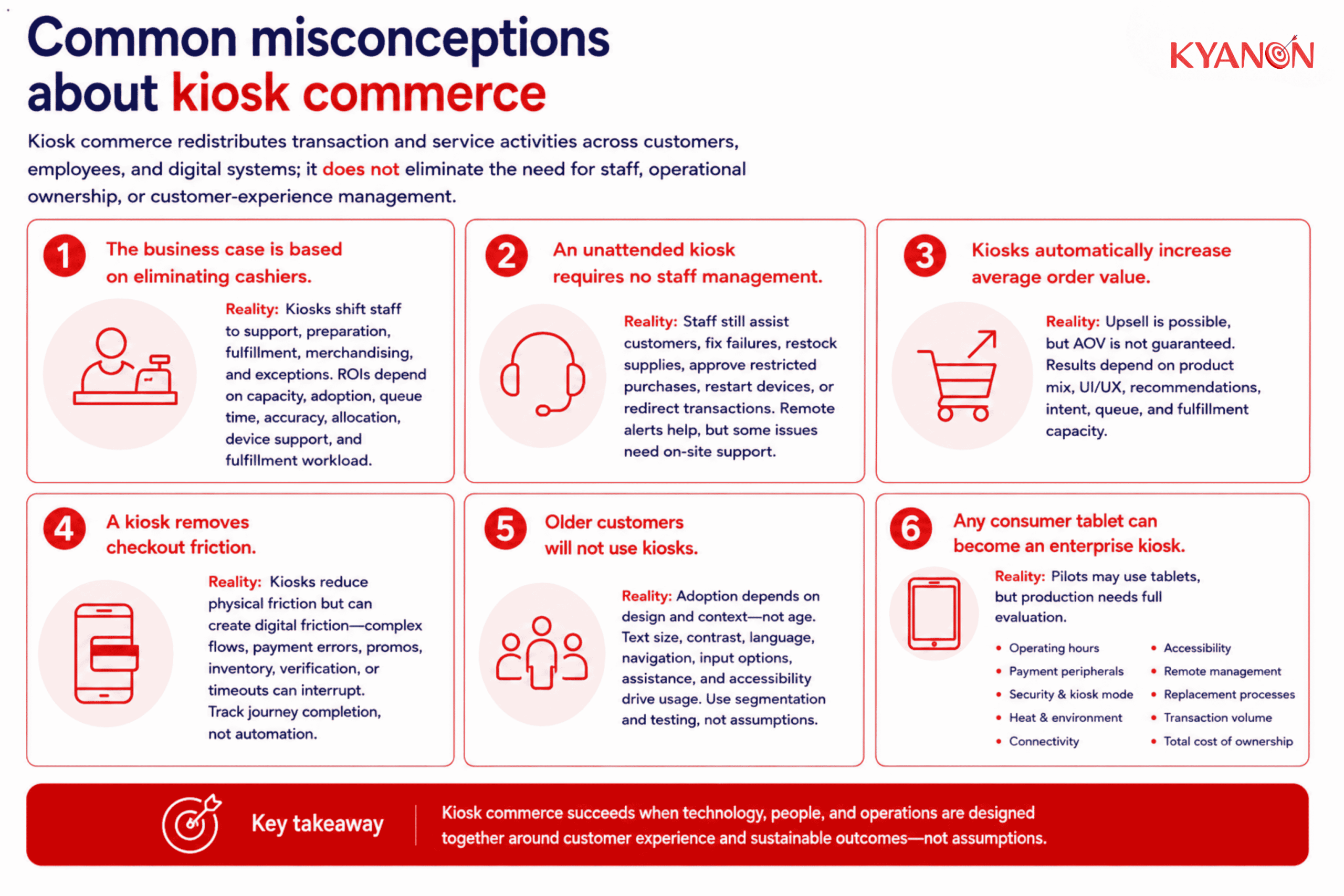
Kiosk commerce redistributes transaction and service activities across customers, employees, and digital systems; it does not eliminate the need for staff, operational ownership, or customer-experience management.
“The business case is based on eliminating cashiers”
Reality: Staff reduction should not be treated as the default kiosk ROI model.
Kiosks can shift employee activity from order entry toward customer support, preparation, fulfillment, merchandising, and exception handling. Business cases should therefore consider transaction capacity, adoption, queue time, order accuracy, staff allocation, device support, and fulfillment workload together.
“An unattended kiosk requires no staff management”
Reality: Self-service does not mean zero operational support.
Employees may still need to assist customers, resolve payment failures, replace printer supplies, approve restricted purchases, restart devices, or redirect transactions when a terminal is unavailable.
Remote monitoring can identify technical issues, but some interventions still require staff at the physical location.
“Kiosks automatically increase average order value”
Reality: Digital recommendations and customization can create upsell opportunities, but an AOV increase is not guaranteed.
Results depend on factors such as product structure, interface design, recommendation logic, customer intent, queue conditions, and fulfillment capacity. A long or confusing flow can instead cause customers to skip optional items or abandon the transaction.
“A kiosk removes checkout friction”
Reality: Kiosks can remove some physical friction while introducing digital friction.
Complex product lookup, unclear modifiers, payment failures, promotion rules, unavailable inventory, verification requirements, or short session timeouts can interrupt the journey.
The relevant KPI is therefore successful journey completion, not automation alone.
“Older customers will not use kiosks”
Reality: Age alone does not determine kiosk usability.
Text size, contrast, screen height, language, navigation complexity, input options, session timing, digital familiarity, accessibility, and available assistance can all affect adoption.
Businesses should therefore use customer segmentation and usability testing rather than assuming that one demographic will or will not use the channel.
“Any consumer tablet can become an enterprise kiosk”
Reality: A consumer device may be sufficient for a pilot, but production deployments require broader operational evaluation.
Enterprises should consider:
- expected operating hours
- payment peripherals
- device security
- kiosk mode
- heat and physical environment
- connectivity
- accessibility
- remote management
- replacement processes
- expected transaction volume
A lower hardware purchase price can increase the total cost of ownership if device failures or manual support repeatedly interrupt transactions.
How Kyanon Digital applies kiosk commerce
Kyanon Digital approaches kiosk commerce as part of a connected retail or F&B architecture rather than as an isolated touchscreen application.
The implementation scope can include:
- customer journey and kiosk UX design
- kiosk application development
- product or menu configuration
- loyalty and customer identification
- digital payment integration
- POS and ERP integration
- inventory visibility
- OMS and fulfillment integration
- kitchen-system integration for F&B
- analytics and transaction tracking
- device-management integration
- testing and quality assurance
- rollout and operational support
The objective is to ensure that kiosk transactions use the same governed product, pricing, promotion, customer, inventory, order, and fulfillment logic as other commerce channels.
Kyanon Digital’s omnichannel development capability includes custom middleware connecting commerce experiences with POS, ERP, CRM, and inventory systems, providing the integration foundation required when kiosk commerce must operate alongside web, mobile, staffed checkout, and other channels.
→ Explore Kyanon Digital’s omnichannel eCommerce development services.











 Create project brief with AI