
What is help center architecture?
Help center architecture is the design of how support content, navigation, search, access rules, and service handoffs work together to help customers find and use relevant assistance.
How help center architecture works
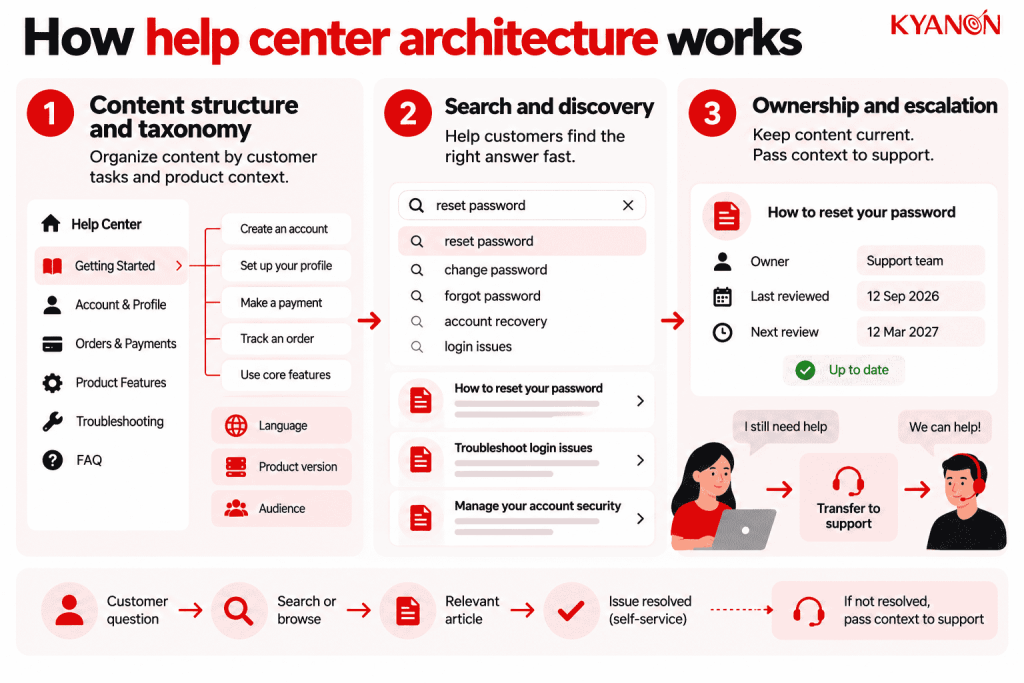
Help center architecture connects a customer’s question with the correct answer and a usable next step. It combines information organization with discovery and service workflows, so success depends on resolution rather than the number of articles published.
Content structure and taxonomy
Organize material around customer tasks and product context, using terms customers recognize. Product version, language, and audience metadata help prevent instructions from being shown in the wrong situation.
Search and discovery
Combine browsing, search relevance, synonyms, and contextual article suggestions. Analyze unsuccessful searches and repeated query reformulation to identify missing content or terminology mismatches.
Ownership and escalation
Give articles to accountable owners and a review lifecycle. When self-service is insufficient, transfer the query and relevant context to support so customers do not have to restart the explanation.

What does a useful help center structure look like?
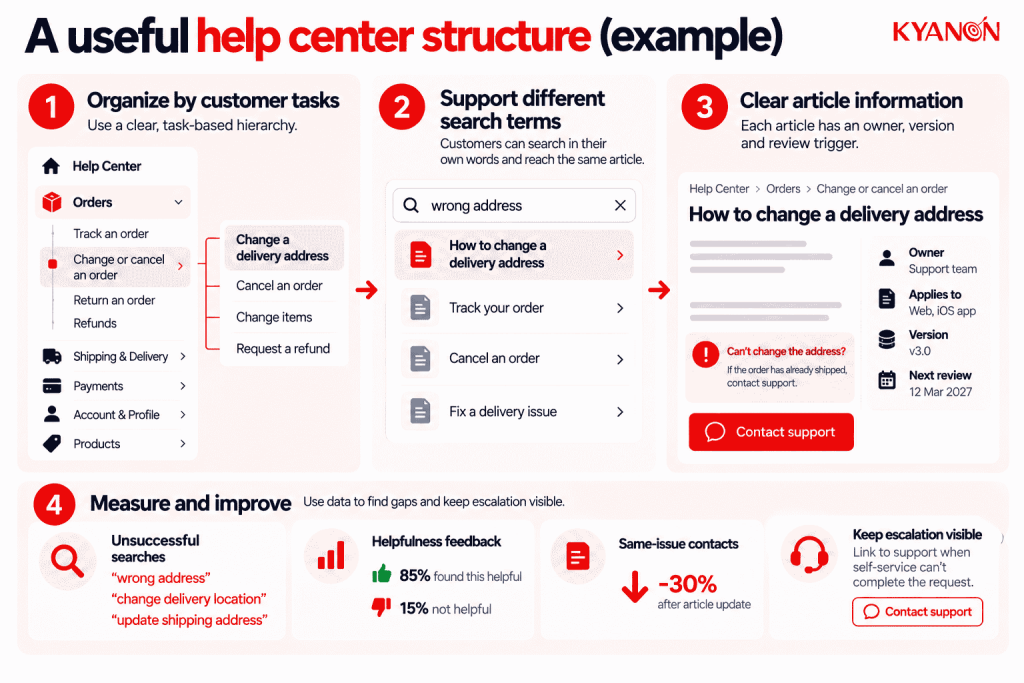
Organize the help center around customer tasks rather than the company’s internal departments. An illustrative commerce hierarchy is Orders → Change or cancel an order → Change a delivery address. Customers should also be able to search their own wording, such as ‘wrong address,’ and reach the same answer.
Each article needs an owner, an applicable product or policy version, and a review trigger. Test the most frequent support questions against both navigation and search. Track unsuccessful searches, helpfulness feedback and subsequent contact about the same issue. A fall in ticket volume alone is weak evidence: customers may have found an answer, abandoned the task or moved to another channel. Keep escalation visible when self-service cannot complete the request.
What makes a help center AI-ready?
A help center designed for AI needs more than searchable articles. The underlying knowledge must be accurate, structured, current, and governed so AI search or support agents can retrieve the right information for the right customer context.
Key requirements include:
- Clear content scope: Separate instructions by product, version, market, role, or policy where the answer changes.
- Consistent terminology: Connect customer language, product terminology, and common query variations.
- Reliable metadata: Identify content ownership, applicability, permissions, and review status.
- Content lifecycle controls: Flag outdated, duplicated, or conflicting guidance before it is surfaced to customers or AI.
- Escalation boundaries: Define when available knowledge is insufficient and the interaction should move to a human or another workflow.
AI can improve how customers discover support knowledge, but it also increases the cost of weak information architecture: outdated or contradictory content can now be surfaced conversationally at a greater scale.
Help center architecture vs. knowledge base (CX)
Help center architecture determines how customers discover and use support; a knowledge base supplies the maintained knowledge within that experience.
| Dimension | Help Center Architecture | Knowledge Base (CX) |
Primary focus | Access, discovery, and support flow | Reusable answers and instructions |
| Typical scope | Navigation, search, permissions, handoff | Articles, FAQs, troubleshooting content |
Main users | Customers navigating help | Customers, agents, and approved AI tools |
| Governance | Findability and journey ownership | Accuracy, versioning, and review |
Success measure | Successful help journeys | Useful and correct answers |
When to consider help center architecture
Consider help center architecture when the following conditions affect customer outcomes or operational control:
- Customers contact support even though the correct answers already exist online.
- Products, languages, or customer groups have outgrown the current category structure.
- A new AI support initiative needs dependable, discoverable source content.
- Search analytics show frequent zero-result queries, repeated reformulation, or customers searching with terminology the current taxonomy does not recognize.
- AI assistants or generative search are being introduced, but the organization cannot reliably identify which support content is current, applicable, and approved for retrieval.
It may not be the right priority if:
A full help center redesign may be unnecessary if a small number of inaccurate articles causes most failures. Correct the content and validate customer discovery before expanding scope.
What causes help center self-service to fail?
Help center problems are not always content problems. The customer symptom can help identify where the architecture is failing.
| Customer symptom | Likely issue to investigate |
Correct article exists but customers cannot find it | Taxonomy, search relevance, or terminology |
| Search returns many similar answers | Duplicate or poorly scoped content |
Instructions no longer match the product | Content ownership or review lifecycle |
| Different articles give different answers | Governance or version control |
Customer reads the article but still contacts support | Incomplete guidance or missing action path |
| Customer must explain the issue again after escalation | Weak self-service-to-agent handoff |
Fix the failure point rather than automatically publishing more articles. In some help centers, better governance, search relevance, or workflow integration can create more value than increasing content volume.
How should businesses measure help center effectiveness?
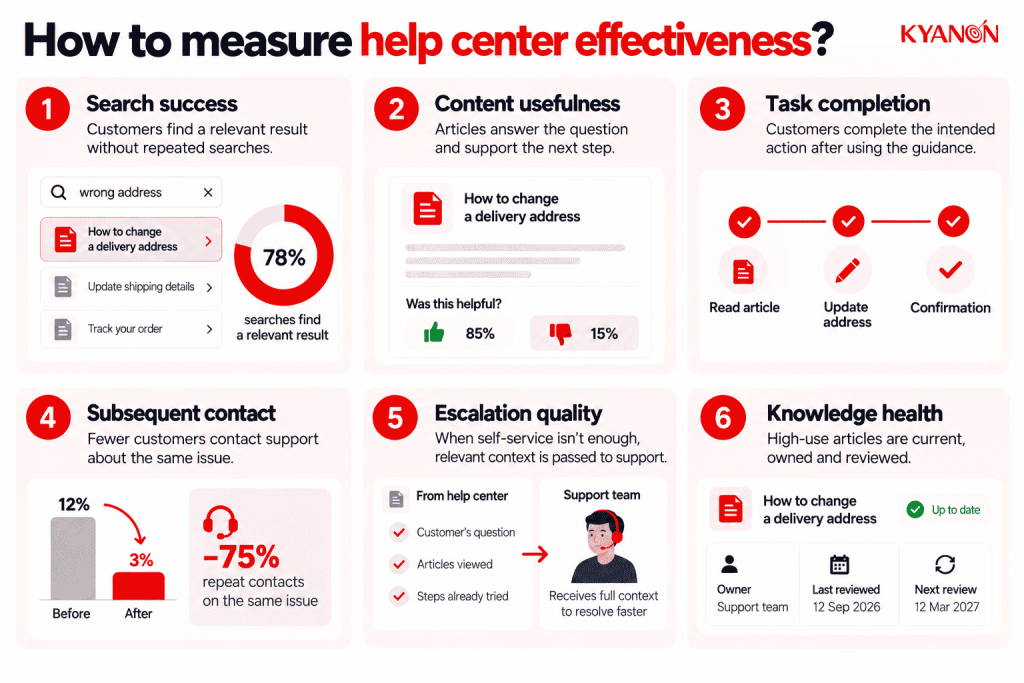
Measure whether customers resolve their need, not simply whether the help center prevents a support ticket.
Useful signals include:
- Search success: Do customers find a relevant result, or repeatedly reformulate the query?
- Content usefulness: Does the article answer the question and support the required next step?
- Task completion: Can customers complete the intended action after using the guidance?
- Subsequent contact: Do customers still contact support about the same issue?
- Escalation quality: When self-service fails, does the support team receive the customer’s query and relevant context?
- Knowledge health: Are high-use articles current, owned, and reviewed when products or policies change?
Ticket deflection should therefore be interpreted alongside resolution and customer effort. A customer who gives up without contacting support has reduced ticket volume but has not completed a successful self-service journey
Why help center architecture matters for SaaS
Help center architecture determines whether self-service actually reduces customer effort or simply moves the effort from the support queue to the customer.
The issue is becoming more important as AI enters service operations. Gartner reported in 2026 that self-service success is among customer-service leaders’ top priorities, while 58% plan to upskill agents into knowledge-management specialists to help maintain accurate, continually updated content for both AI and customer self-service.
Architecture must also preserve a route out of self-service. In a 2026 survey of 1,000 U.S. consumers, 93% said it was important to make reaching a person easy when automated support could not resolve an issue.
For SaaS businesses, the objective is therefore not maximum deflection. It is to resolve repeatable questions efficiently while transferring unresolved or higher-complexity issues to the appropriate support path with enough context for the customer to continue rather than restart.
Common misconceptions
“A search box solves findability.”
Reality: Search quality depends on content structure, language, metadata, and relevance. A search box cannot resolve contradictory or outdated guidance.
“Deflecting contact means the help center worked.”
Reality: Customers may leave because they cannot find an answer or reach support. Validate resolution with feedback, task completion, and subsequent contact behavior.
How Kyanon Digital supports help center architecture
Kyanon Digital can support help center architecture as part of broader customer-experience and service-platform initiatives, connecting information architecture with the systems and workflows customers use to resolve issues.
The implementation can include task-based content structures, search and discovery experiences, access rules, analytics, and integration with support or agent workflows. Where AI-powered self-service is introduced, the underlying knowledge should remain governed by clear ownership, applicability, review processes, and escalation boundaries.
Effective help center architecture ultimately connects reliable knowledge, findability, task completion, and contextual escalation so customers can resolve straightforward needs independently without being trapped in self-service when they require assistance.
Explore Kyanon Digital’s UX design services.

 Create project brief with AI