
What is in-app support?
In-app support is customer assistance embedded within a mobile or web application, allowing users to access guidance, communicate with support, or manage a service request without unnecessarily leaving their current product journey.
Unlike simply adding a chat widget, in-app support can use permitted application context, such as the current task, account state, error, or transaction reference, to make assistance more relevant and help the customer continue where the problem occurred.
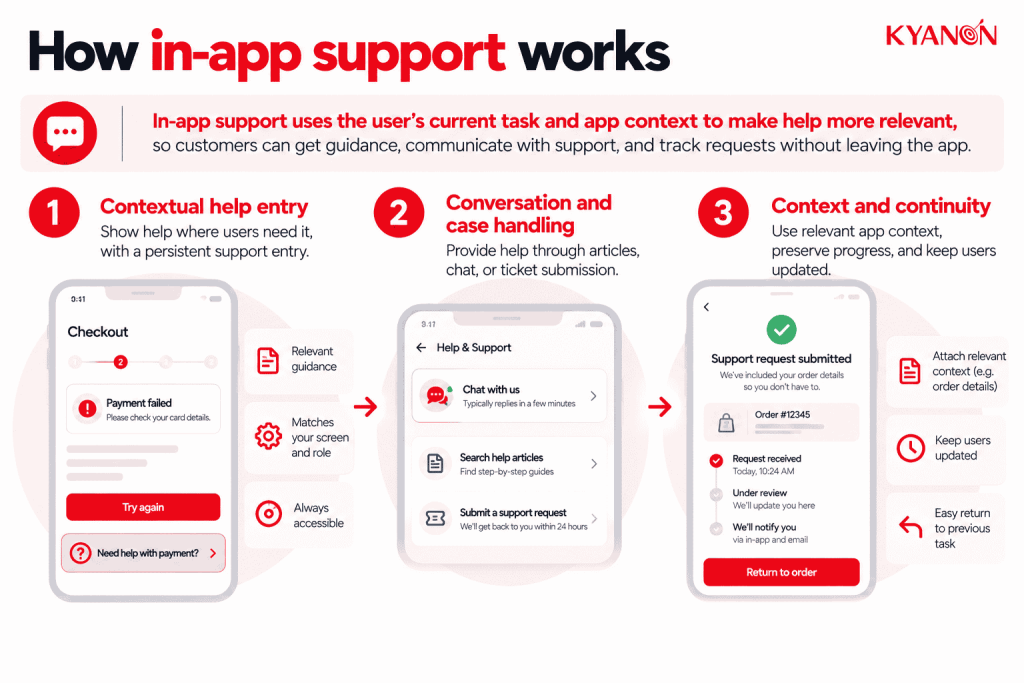
How in-app support works
In-app support uses the customer’s current task and authorized application context to make help more relevant. A good design preserves progress, limits unnecessary data sharing, and makes the next step understandable whether help is automated or human-delivered.
Contextual help entry
Offer help where uncertainty or errors occur, alongside a persistent support entry point. Match guidance to the relevant screen, product version, and user role rather than displaying the same instructions everywhere.
Conversation and case handling
Support can include articles, chat, asynchronous messaging, and ticket submission. Explain availability and expected response time so users do not mistake an unanswered message for a live conversation.
Context and continuity
Attach relevant error codes or transaction references only when appropriate and permitted. Preserve the user’s task state and provide updates or a safe return path after the support interaction.

Which type of in-app support fits the problem?
Match the support format to the task. Contextual help suits a field or setting; searchable articles suit repeatable procedures; asynchronous messaging suits an issue that can continue later; live assistance suits a blocked task that needs dialogue. A chatbot is one possible interface, not a requirement for in-app support.
An illustrative payment-support flow can pass an authorized transaction reference, app version and error state to the support team, so the customer does not have to reconstruct the problem. Avoid automatically attaching unrelated sensitive information. Preserve the customer’s place in the task, explain the expected response time, and provide a continuation route if the session closes. Measure whether customers resume and complete the original task after receiving help.
What context should in-app support use?
In-app support should pass the minimum context needed to diagnose or continue the customer’s task.
Useful context can include:
| Context | Support value |
Current screen or workflow | Identifies where the problem occurred |
| Error or status code | Reduces manual troubleshooting |
Transaction or case reference | Connects support to the relevant record |
| App and operating-system version | Helps diagnose technical issues |
Completed steps | Prevents customers from repeating work |
| Authenticated customer context | Supports appropriate account-specific assistance |
More context is not automatically better. Payment credentials, unrelated screen content, sensitive records, or data outside the support purpose should not be attached simply because the application can access them.
The design question is therefore not “How much context can we send?” but “What information does support need to resolve this issue without making the customer repeat it?”
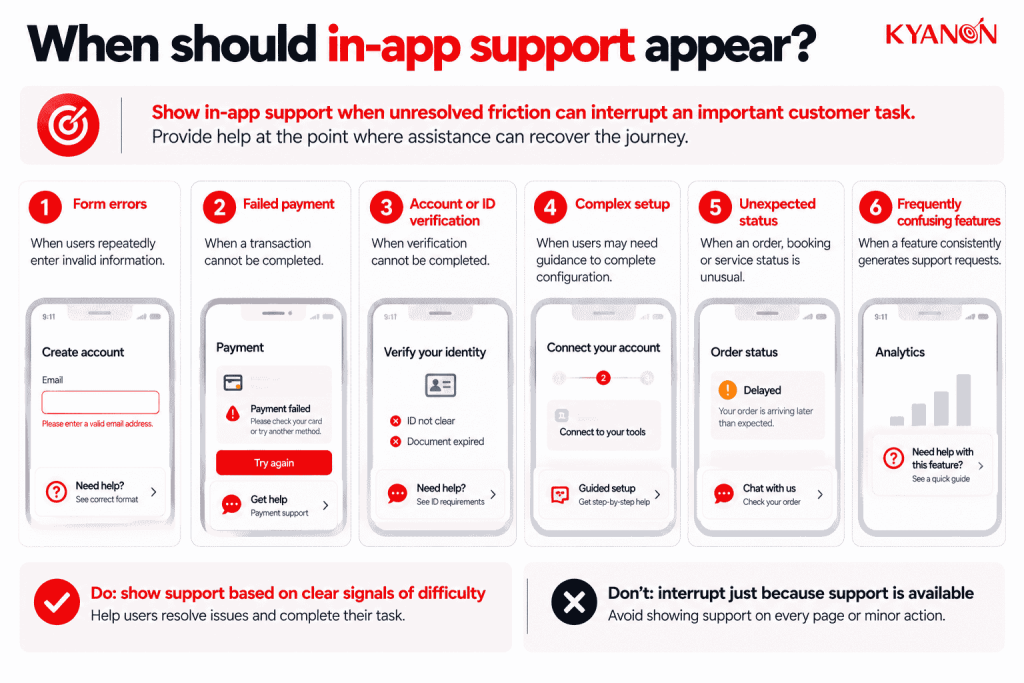
When should in-app support appear?
In-app support creates the most value where unresolved friction can interrupt an important customer task.
Priority points can include:
- Repeated validation or form errors
- Failed payments or transactions
- Account or identity-verification problems
- Complex setup or configuration steps
- Unexpected order, booking, or service status
- Features that consistently generate support contacts
Avoid interrupting customers merely because support is available. Proactive guidance should respond to meaningful signals of difficulty rather than every hesitation or navigation event.
The objective is to provide help at the point where assistance can recover the journey, not to maximize support-widget engagement.
In-app support vs. standalone help center
In-app support provides assistance within the product context; a standalone help center provides a separate destination for discovery and reference.
| Dimension | In-App Support | Standalone Help Center |
Entry point | Current application or task | Separate help site |
| Available context | Can include authenticated task context | Often requires user-provided context |
Typical use | Resolve an immediate obstacle | Browse guidance and research procedures |
| Dependency | App integration and release management | Content platform and search management |
Success measure | Resolved issue and resumed task | Successful search and self-service resolution |
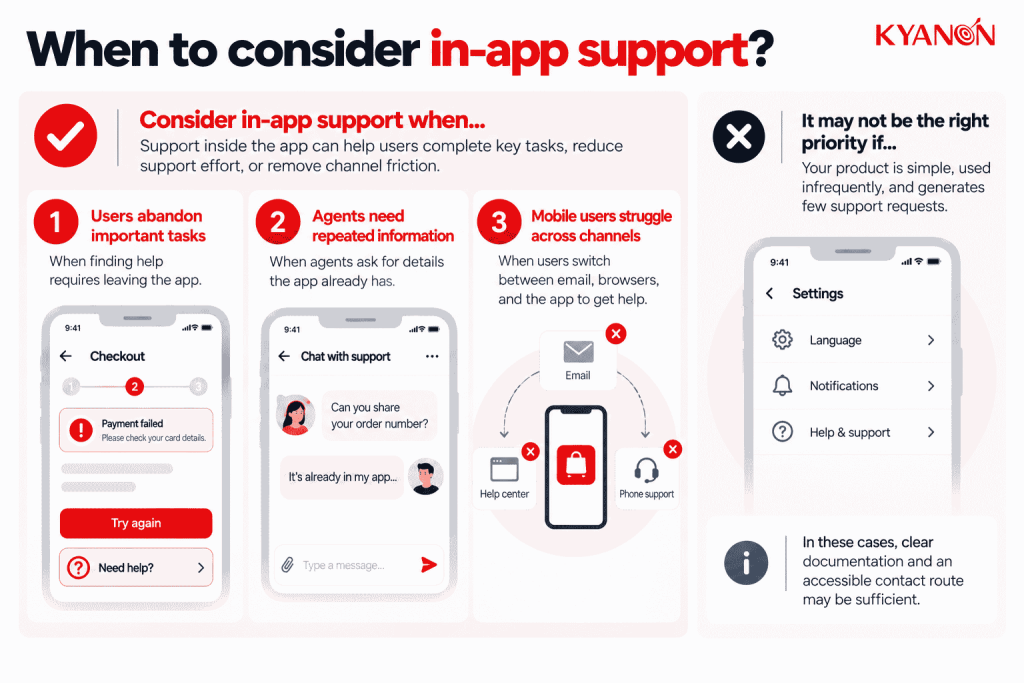
When to consider in-app support
Consider in-app support when the following conditions affect customer outcomes or operational control:
- Users abandon important tasks because finding help requires leaving the application
- Support agents spend time asking for information the product could safely provide
- Your mobile customers struggle to move between email, browsers, and the application
It may not be the right priority if:
An embedded support SDK may be unnecessary for a simple, infrequently used tool with few support requests. Accessible contextual guidance and a clear contact route may suffice.
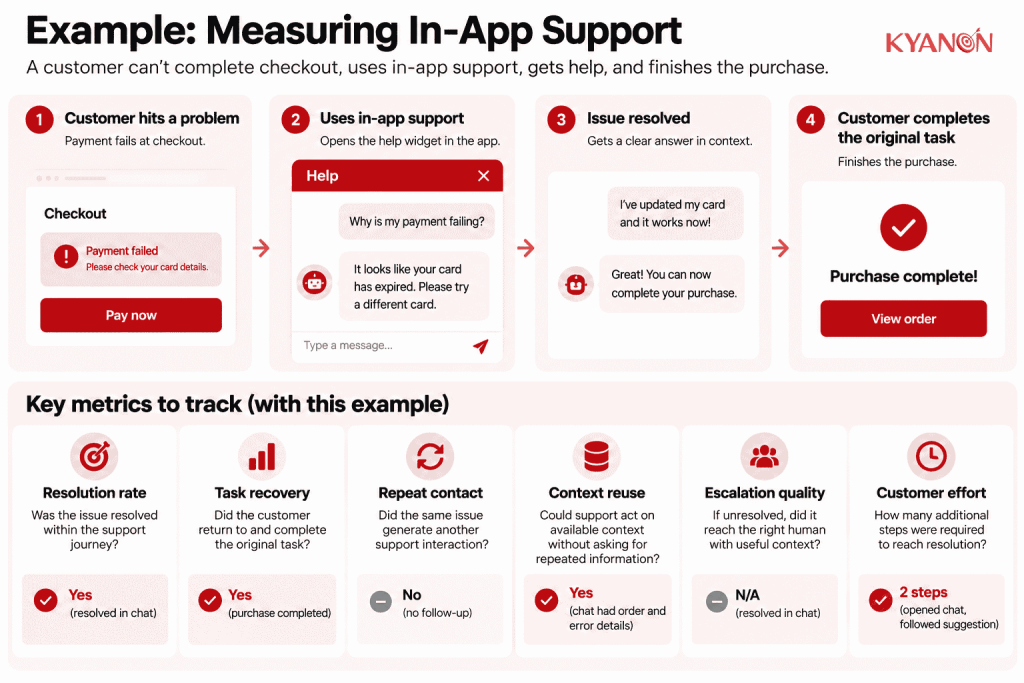
How should businesses measure in-app support?
Measure whether support helps customers recover and continue their original journey, not simply how often they open a help interface.
Useful signals include:
- Resolution rate: Was the issue resolved within the support journey?
- Task recovery: Did the customer return to and complete the original task?
- Repeat contact: Did the same issue generate another support interaction?
- Context reuse: Could support act on available context without asking the customer to repeat information?
- Escalation quality: Did unresolved cases reach the appropriate human or specialist with useful context?
- Customer effort: How many additional steps were required between encountering the problem and reaching resolution?
A high support-widget engagement rate can indicate useful assistance, but it can also indicate a difficult product journey. Support metrics should therefore be interpreted alongside the task or feature that generated the request.
Why in-app support matters for SaaS and mobile commerce
In-app support matters when leaving the product to find help adds unnecessary effort or causes customers to abandon an important task.
Gartner reported in 2026 that customer-service leaders ranked customer satisfaction, operational efficiency, and self-service success among their top priorities. Separate Gartner research involving 3,566 B2B and B2C customers found that customers were approximately three times more likely to use third-party GenAI tools than company-provided customer-service chatbots.
For product teams, the implication is that embedding another support interface is not enough. In-app support becomes useful when it can understand the relevant task context, connect customers to appropriate knowledge or assistance, preserve their progress, and provide a clear route back to completion.
The business outcome to optimize is therefore not support engagement itself, but successful recovery of the customer journey with less avoidable effort.
Common misconceptions
“Adding a chat widget completes in-app support.”
Reality: A chat interface is only an entry point. Effective in-app support also requires relevant knowledge, appropriate context, case ownership, escalation, and a route back to the customer’s original task.
“We should capture the entire screen to help agents.”
Reality: More context is not automatically more useful. Screens may contain sensitive or unrelated information. Pass only the data required for the support purpose, with appropriate access controls, disclosure, and redaction.
“More in-app support interactions mean the experience is working.”
Reality: High support usage can also indicate product friction. Evaluate support interactions alongside resolution, task recovery, repeat contact, and the underlying product step that generated the request.
How Kyanon Digital supports in-app support implementation
Kyanon Digital can integrate support capabilities into mobile and web application journeys as part of broader product, CX, and system-integration initiatives.
Depending on the use case, the implementation can connect contextual guidance, knowledge, messaging or case workflows with authenticated application context and backend systems. The design should control which customer and task information is transferred, preserve continuity when escalation occurs, and provide a clear route back to the original journey.
Effective in-app support should therefore be designed as part of the product experience rather than added as an isolated support widget. Its value comes from connecting the customer’s problem, relevant application context, the appropriate resolution path, and successful continuation of the task.
Explore Kyanon Digital’s mobile development services.

 Create project brief with AI