
What is multi-storefront?
Multi-storefront is a commerce architecture in which multiple customer-facing stores share a commerce backend or common services while retaining storefront-specific domains, design, catalog, pricing, content, and policies.
The storefronts may represent separate brands, countries, languages, product lines, or B2B and B2C customer segments.
Adobe Commerce supports multiple websites, stores, and store views through one Commerce instance and administration environment. Each site or view can use different domains, languages, currencies, categories, products, and content.
How multi-storefront works
Multi-storefront works through controlled sharing: reusable commerce capabilities are managed centrally, while scoped configurations determine how each storefront behaves.
This structure reduces duplicated platform operations without requiring every brand, region, or customer segment to use the same experience.
Shared commerce core
The shared core can manage functions such as products, inventory, customers, orders, payments, promotions, search, and enterprise integrations.
Centralizing selected functions gives storefronts access to common business logic and data. It does not require every underlying system to be merged into one database or application.
Adobe Commerce, for example, uses one codebase and administration environment to operate several websites or store views. BigCommerce similarly represents each storefront as a channel connected to shared platform capabilities.
Configuration scope and inheritance
Configuration scope determines which settings are shared globally and which can be overridden for a website, store, store view, market, or channel.
A global catalog attribute may be reused everywhere, while pricing, language, design, or product visibility can differ by storefront. This inheritance model reduces repeated configuration while preserving local control.
Adobe Commerce applies a cascading hierarchy from global to website, store, and store view. BigCommerce assigns products, pricing, themes, and settings to individual storefront channels.
Channel-aware integration and governance
Every transaction must retain the storefront context that identifies the relevant catalog, price, currency, language, customer policy, payment method, and fulfilment workflow.
Integrations with PIM, ERP, CRM, OMS, POS, tax, payment, logistics, and marketing systems must therefore be channel-aware. An application that ignores storefront context can publish data, prices, or settings to the wrong customer experience.
BigCommerce advises application providers to account for channel-specific catalogs, price lists, currencies, themes, customers, and storefront assignments when supporting multi-storefront environments.

What are the core multi-storefront capabilities?
Core multi-storefront capabilities include centralized administration, independent customer experiences, scoped catalogs and pricing, localization, and storefront-level governance.
|
Capability |
What it controls |
Business value |
|
Centralized administration |
Shared products, configurations, customer operations, orders, and channel settings | Reduces repeated administrative work across related stores |
| Independent storefront design | Themes, layouts, navigation, logos, components, and customer journeys |
Preserves distinct brand and audience experiences |
|
Custom domains |
Separate domains, subdomains, or regional URL structures | Supports individual brands and market-specific websites |
| Catalog control | Product assignments, categories, visibility, and storefront assortments |
Shows only relevant products in each market or channel |
|
Storefront pricing |
Price lists, currencies, discounts, and promotional rules | Supports regional, brand, and customer-specific commercial models |
| Localization | Language, translated content, currency, tax, payments, and delivery settings |
Adapts the buying journey to local operating requirements |
|
Targeted content |
Landing pages, banners, product content, campaigns, and transactional emails | Allows each storefront to communicate with its own audience |
| Reporting and permissions | Store-, channel-, or website-level reporting and administrative access |
Provides consolidated oversight while limiting local access |
Adobe Commerce allows stores to use separate product selections and designs, website-level pricing, store-view localization, and email templates configured by website, store, or store view. BigCommerce supports channel-specific themes, product assignments, price lists, domains, currencies, and localized shipping methods. Shopify Markets supports market-specific languages, domains, pricing, currencies, product availability, and theme content.
Centralized administration does not mean that every business system must appear in one literal dashboard. PIM, ERP, OMS, CRM, and analytics tools may remain separate while exchanging governed data with the shared commerce platform.
Multi-storefront vs. separate store instances
Multi-storefront shares selected commerce services across several customer-facing stores, while separate store instances maintain independent accounts, data, integrations, releases, and administration.
|
Dimension |
Multi-storefront |
Separate store instances |
|
Backend administration |
Centralized or federated administration | Separate administration and logins |
| Product catalog | Shared master data with storefront assignments |
Independent catalogs |
|
Product visibility |
Controlled through channel or website rules | Managed separately in each store |
| Pricing | Shared defaults with storefront-level price lists or overrides |
Configured independently |
|
Inventory |
Can use shared or allocated inventory sources | Requires synchronization between stores |
| Customer and order data | Can be shared, scoped, or consolidated |
Usually isolated by platform instance |
|
Frontend experience |
Each storefront can use a distinct design | Each store controls its own design |
|
Reporting |
Shared reporting with store or channel views |
Reporting is split unless externally consolidated |
| Integrations | Core connectors can be reused |
Connectors may need to be implemented repeatedly |
|
Platform upgrades |
Shared platform changes affect several storefronts | Stores can upgrade independently |
| Failure scope | Shared-service failures may affect several stores |
Failures are more likely to remain isolated |
|
Operational overhead |
Less duplication but more configuration governance | More duplication but clearer separation |
| Best fit | Related brands, regions, or customer segments sharing operations |
Businesses requiring strong technical, legal, or operational isolation |
Adobe Commerce can generate sales reports for an entire website or an individual store, illustrating how shared administration can retain store-level reporting.
The term multi-store is not standardized across commerce platforms. Some vendors use it to describe stores within one shared installation, while others use it for separate accounts; architecture decisions should therefore be based on actual sharing and isolation requirements rather than terminology alone.
When to consider multi-storefront
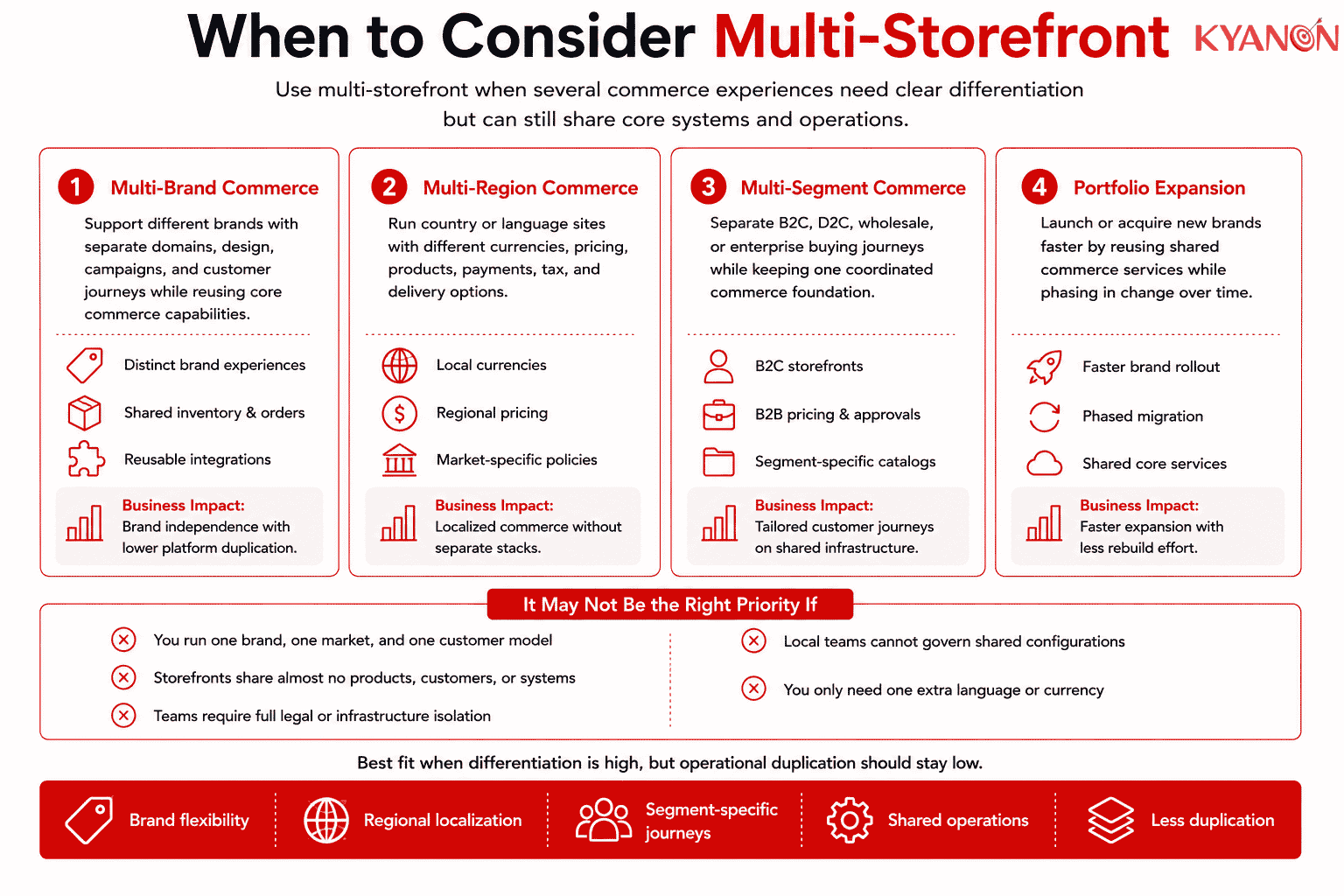
Multi-storefront should be considered when several commerce experiences need meaningful differentiation but share enough data, systems, and operational processes to justify one coordinated platform.
Multi-brand commerce
Multi-storefront is relevant when a corporate group operates several brands that require different domains, visual identities, catalogs, campaigns, and customer journeys.
The brands can retain independent storefront experiences while reusing product, inventory, order, payment, security, or integration capabilities.
Multi-region commerce
Multi-storefront support for country- or language-specific sites that require different currencies, prices, products, payments, taxes, delivery options, and legal content.
Adobe Commerce, BigCommerce, and Shopify all provide platform models for adapting commerce experiences by website, channel, market, language, or region.
Multi-segment commerce
Multi-storefront can separate B2C, D2C, wholesale, distributor, and enterprise-account journeys without creating unrelated commerce stacks.
A B2B portal may require account-specific catalogs, price lists, purchase approvals, quotations, and bulk ordering, while the B2C storefront prioritizes public pricing and individual checkout.
Acquisition and portfolio expansion
Enterprises acquiring or launching brands may use multi-storefront architecture to introduce new experiences without rebuilding every commerce capability.
A phased model can keep selected legacy systems temporarily while moving shared functions into a coordinated commerce foundation.
It may not be the right priority if:
- The business operates one brand, one market, and one customer model.
- The storefronts share almost no products, customers, orders, or enterprise systems.
- Business units require complete legal, data, infrastructure, or release isolation.
- Local teams cannot govern shared configurations and dependencies.
- The requirement is limited to adding one language or currency already supported by the existing storefront.
Multi-storefront should reduce meaningful operational duplication; it should not be adopted only because a company owns several domains.
Why multi-storefront matters for enterprise commerce
Multi-storefront matters because enterprise expansion often creates more brands, markets, and customer models than independently managed store instances can support efficiently.
A shared commerce foundation can reduce repeated catalog work, integrations, security controls, releases, and infrastructure management while retaining local commercial differences.
Kyanon Digital reported in 2026 that an integrated retail commerce platform managed more than 26,000 SKUs across six digital sales channels, processed more than 8,000 orders per day, and moved 99% of offline promotions into online campaigns.
The implementation centralized product availability, inventory, pricing, promotions, and orders across owned and third-party channels. Although the case is an omnichannel deployment rather than a pure multi-storefront implementation, it demonstrates the operating value of coordinating multiple customer-facing experiences through shared commerce services.
In another Kyanon Digital implementation case study, a consumer brand used distinct B2C mobile, B2C eCommerce, and B2B portal experiences connected with shared CRM, ERP, commerce, and loyalty capabilities.
These cases illustrate the architectural principle behind multi-storefront: experiences can remain distinct while common business capabilities are reused and governed centrally.
Common misconceptions about multi-storefront
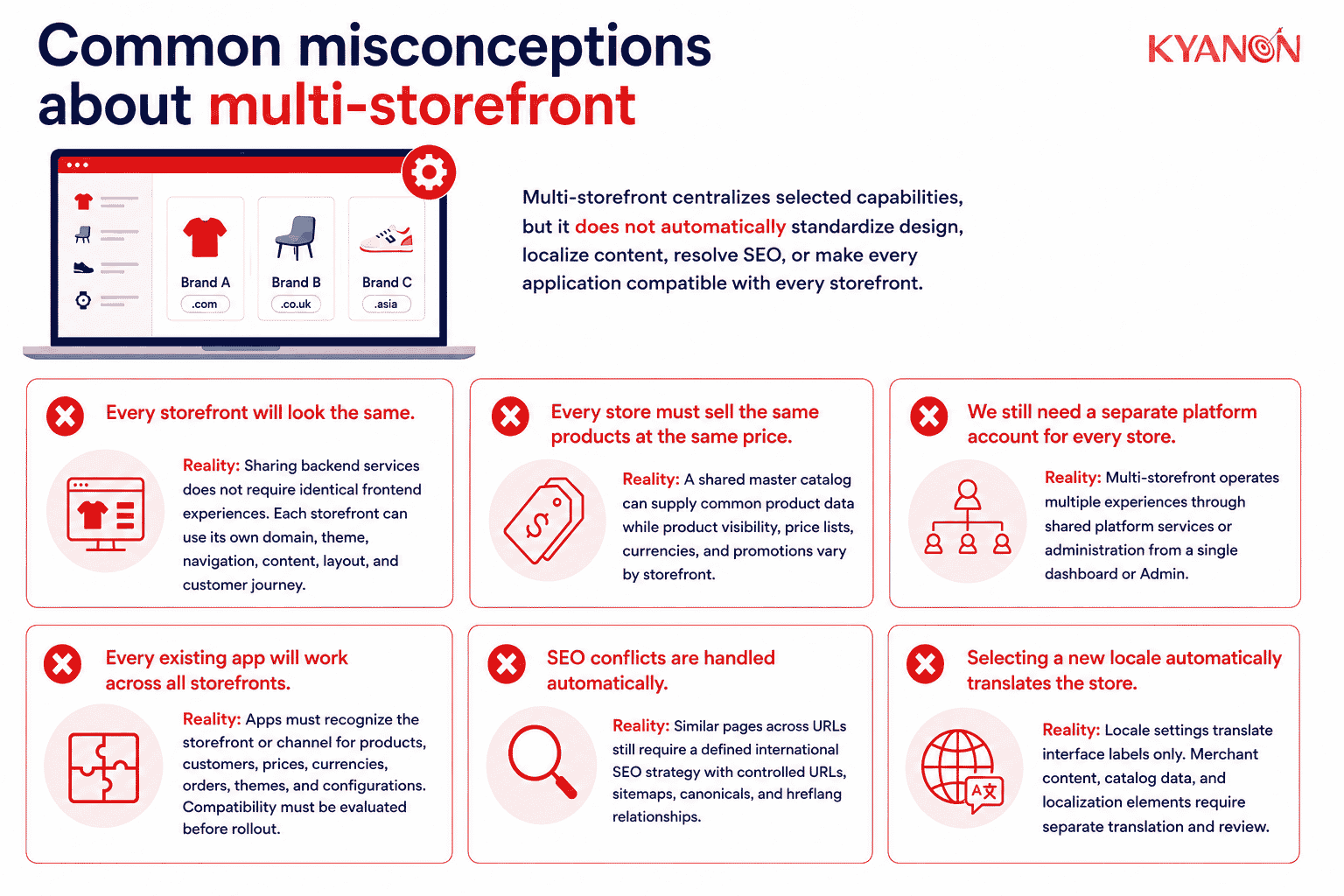
Multi-storefront centralizes selected capabilities, but it does not automatically standardize design, localize content, resolve SEO, or make every application compatible with every storefront.
“Every storefront will look the same.”
Reality: Sharing backend services does not require identical frontend experiences.
Each storefront can use its own domain, theme, navigation, content, layout, and customer journey. Adobe Commerce and BigCommerce both support storefront-specific designs or theme configurations within shared platform environments.
“Every store must sell the same products at the same price.”
Reality: A shared master catalog can supply common product data while product visibility, price lists, currencies, and promotions vary by storefront.
Adobe Commerce supports website-level pricing and product assignments, while BigCommerce and Shopify support channel- or market-specific availability and pricing.
“We still need a separate platform account for every store.”
Reality: Multi-storefront is intended to operate multiple experiences through shared platform services or administration.
Adobe Commerce uses one codebase and Admin for multiple websites or store views, while BigCommerce describes Multi-Storefront as managing several regions and segments from one dashboard.
“Every existing app will work across all storefronts.”
Reality: Applications must recognize the storefront or channel associated with products, customers, prices, currencies, orders, themes, and configurations.
An application built for one store can create incorrect assignments or fragmented workflows when reused without multi-storefront support. Compatibility must be evaluated before rollout.
“SEO conflicts are handled automatically.”
Reality: Similar product and category pages across regional or branded URLs still require a defined international and duplicate-content strategy.
Google recommends separate URLs for language versions and hreflang annotations for regional or language alternatives. Canonical URLs should point to the preferred version in the same language where possible.
Each storefront should therefore have controlled URLs, sitemaps, canonicals, hreflang relationships, and differentiated content where customer intent differs.
“Selecting a new locale automatically translates the store.”
Reality: Locale settings can translate standard interface labels, but merchant-created content usually requires separate translation and review.
Adobe states that product names, descriptions, categories, CMS pages, and content blocks must be translated separately for each store view. BigCommerce similarly distinguishes translated catalog data from static storefront content.
Localization also covers product availability, search terminology, imagery, pricing, payments, tax presentation, delivery promises, customer support, and legal information, not language alone.
How Kyanon Digital applies multi-storefront
Kyanon Digital designs and builds multi-storefront architectures for enterprises operating several brands, markets, product lines, or B2B and B2C customer models.
The implementation approach typically includes:
- Scope blueprint: Defining which products, prices, customers, inventory, orders, content, and configurations are shared or isolated.
- Platform architecture: Selecting Adobe Commerce, Magento, composable platforms, or custom services according to storefront complexity and TCO.
- Experience separation: Creating distinct frontend journeys while reusing governed commerce capabilities.
- Enterprise integration: Connecting PIM, ERP, CRM, OMS, POS, payment, inventory, logistics, loyalty, and marketing systems.
- Localization design: Configuring language, currency, pricing, catalog, payment, tax, delivery, and legal requirements by market.
- SEO governance: Establishing domain, URL, canonical, sitemap, and hreflang standards for each storefront.
- Release governance: Testing shared components and local overrides before deploying changes across brands or regions.
- Phased rollout: Launch priority storefronts first, then extend the architecture with reusable components and integrations.
Kyanon Digital’s Magento capabilities include operating multiple storefronts, languages, and regions through one backend, alongside catalog, inventory, B2B/B2C, search, and enterprise integration functions.
Kyanon Digital also develops middleware that connects eCommerce experiences with POS, ERP, CRM, and inventory systems, allowing storefronts to share operational data without requiring every enterprise system to be replaced.
The objective is not to centralize every business decision. It is to centralize capabilities that benefit from reuse while preserving the brand, market, pricing, content, and customer differences that create commercial value.
→ Explore Kyanon Digital’s Magento eCommerce development services.











 Create project brief with AI