
What is progressive checkout?
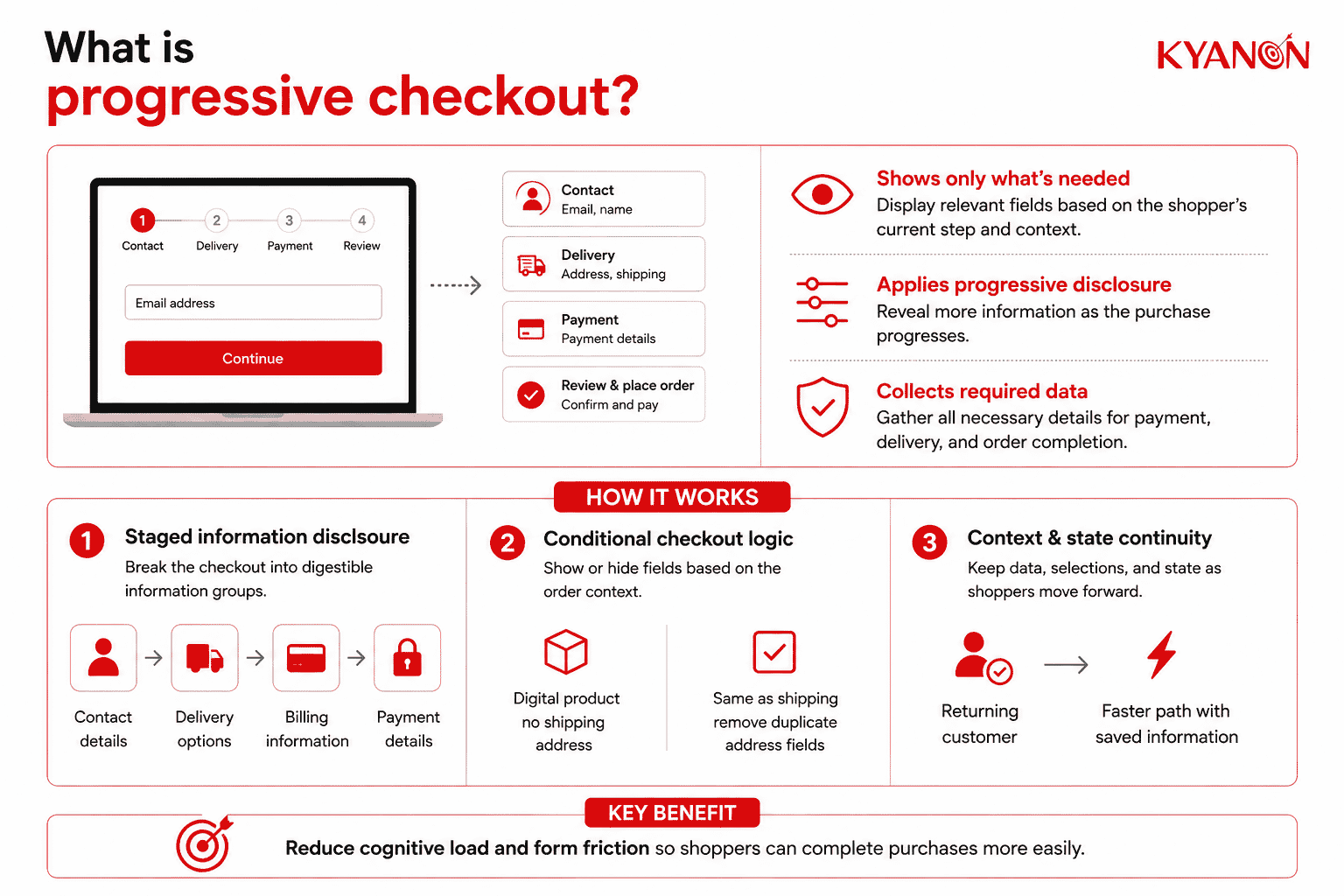
Progressive checkout is an eCommerce checkout pattern that reveals information, fields, and actions in stages based on what the shopper needs to complete at that point in the purchase. It applies progressive disclosure to reduce visible complexity while still collecting the information required for payment, delivery, and order completion.
Progressive checkout is not a standardized commerce-platform category or a fixed number of pages. The same principle can be implemented through multiple screens, expandable sections, or conditional fields within one interface.
How progressive checkout works
Progressive checkout works by displaying only the inputs relevant to the shopper’s current task or context, then revealing additional information as the transaction progresses. Nielsen Norman Group identifies progressive disclosure as a way to reduce cognitive load in long forms by using staged pages or conditional logic rather than exposing every field simultaneously.
A typical commerce journey might move from contact information to delivery options and then payment, while conditional rules remove fields that do not apply to the transaction.
Staged information disclosure
The checkout separates a complex transaction into smaller information groups such as contact details, delivery, billing, and payment. The objective is not to maximize the number of steps; it is to reduce how much information the shopper must evaluate at one time. Baymard Institute’s checkout research similarly finds that the number of form fields has greater usability impact than the number of checkout steps.
Conditional checkout logic
Fields and options appear only when they are relevant to the order. A digital product may not require a shipping address, while selecting “billing address same as shipping” can remove duplicate address entry.
Conditional disclosure is a core progressive-disclosure technique because it prevents users from processing inputs that do not apply to their current task.
Context and state continuity
A progressive checkout must preserve entered data, selected fulfillment options, pricing, and transaction state as the shopper moves through the flow. Returning customers can also follow shorter paths when saved shipping or payment information is available; accelerated checkouts, for example, can automatically populate saved details for returning shoppers.
Progressive checkout vs. one-page checkout
Progressive checkout and one-page checkout differ primarily in how information is exposed, not simply in how many URLs or screens the shopper visits. Progressive disclosure can operate across several steps or inside a single page, while a one-page checkout places the main transaction stages within one page.
| Dimension | Progressive checkout | One-page checkout |
Primary design principle | Reveal information according to current need and context | Keep the main checkout stages on one page |
| Number of steps | Flexible; one or multiple staged states | One page |
Field visibility | Only relevant or current fields need to be visible | Multiple checkout sections are available within the same page |
| Conditional logic | Core design characteristic | Optional |
Visible form density | Designed to remain limited at each stage | Depends on total fields and layout |
| Best suited for | Complex, conditional, mobile-heavy, or varied purchase journeys | Relatively straightforward purchase journeys with limited required input |
Optimization priority | Relevance, cognitive load and contextual progression | Page consolidation and reduced navigation |
Neither approach is universally better. Shopify, for example, currently allows merchants to switch between one-page and three-page checkout layouts while collecting the same customer information, demonstrating that page count is a configurable UX choice rather than a universal conversion rule.
When to consider progressive checkout
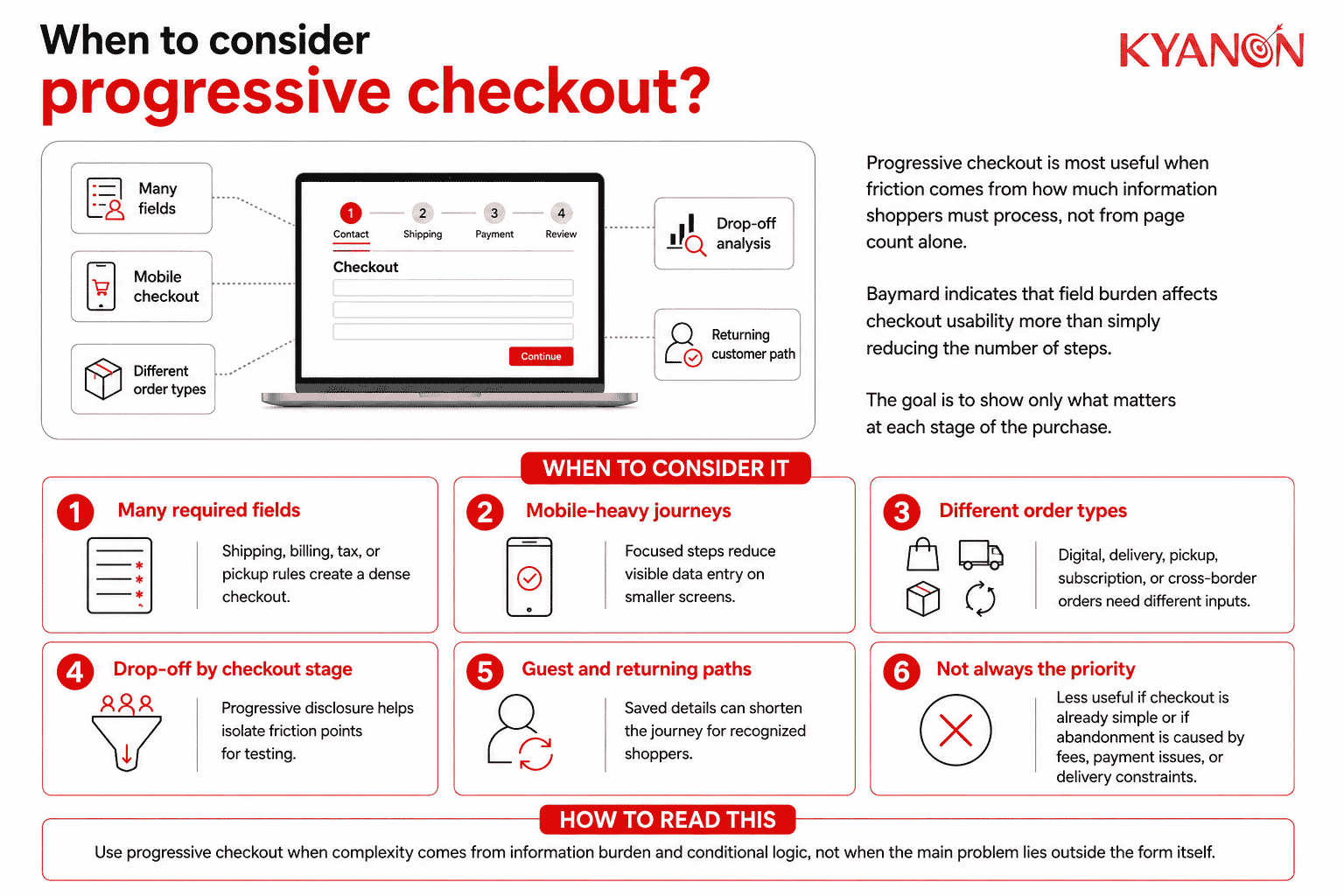
Progressive checkout is most relevant when checkout friction comes from the volume or conditionality of information shoppers must process rather than from page count alone. Baymard’s research indicates that the number of fields users must manage has more influence on checkout usability than simply reducing the number of steps.
Consider progressive checkout if:
- Your checkout has many required or conditional fields. Shipping methods, billing rules, tax information, pickup choices, or regional requirements are creating a dense checkout interface.
- Mobile customers face heavy data-entry requirements. Breaking the transaction into focused stages can reduce the amount of information visible on a smaller screen.
- Different orders require different information. Digital products, store pickup, home delivery, subscriptions, or cross-border purchases should not force every buyer through identical fields.
- Your analytics show concentrated drop-off around specific checkout sections. Progressive disclosure can isolate those stages for UX testing and optimization.
- You need different paths for guests and returning customers. Saved customer information and accelerated payment methods can shorten the journey for recognized buyers.
It may not be the right priority if:
- The existing checkout is already short and requires very little information. Adding unnecessary transitions to an already simple purchase can introduce rather than remove interaction cost.
- The main abandonment problem is outside form design. Unexpected fees, unavailable payment methods, payment failures, delivery constraints, or site errors require different fixes; Baymard lists each of these separately among reasons shoppers abandon checkout.
Why progressive checkout matters for eCommerce
Progressive checkout matters because checkout complexity can interrupt transactions after shoppers have already demonstrated purchase intent.
Baymard Institute’s 2026 data shows that 17% of U.S. online shoppers have abandoned an order because the checkout process was too long or complicated. Its current benchmark also finds that the average U.S. checkout presents 23.48 form elements by default, compared with an optimized flow of approximately 12–14 elements.
The issue is therefore not simply the number of checkout pages. Progressive checkout can reduce the amount of information shoppers must process at one time by revealing fields according to the current transaction stage and context.
The broader optimization opportunity remains significant. Baymard’s current benchmark of 344 leading U.S. and European eCommerce sites finds that 65% have “mediocre” or worse checkout UX, while only 2% are rated “good.”
These findings support progressive disclosure as one checkout-design approach, but they should not be interpreted as evidence that progressive checkout itself guarantees a specific conversion uplift.
Common misconceptions about progressive checkout
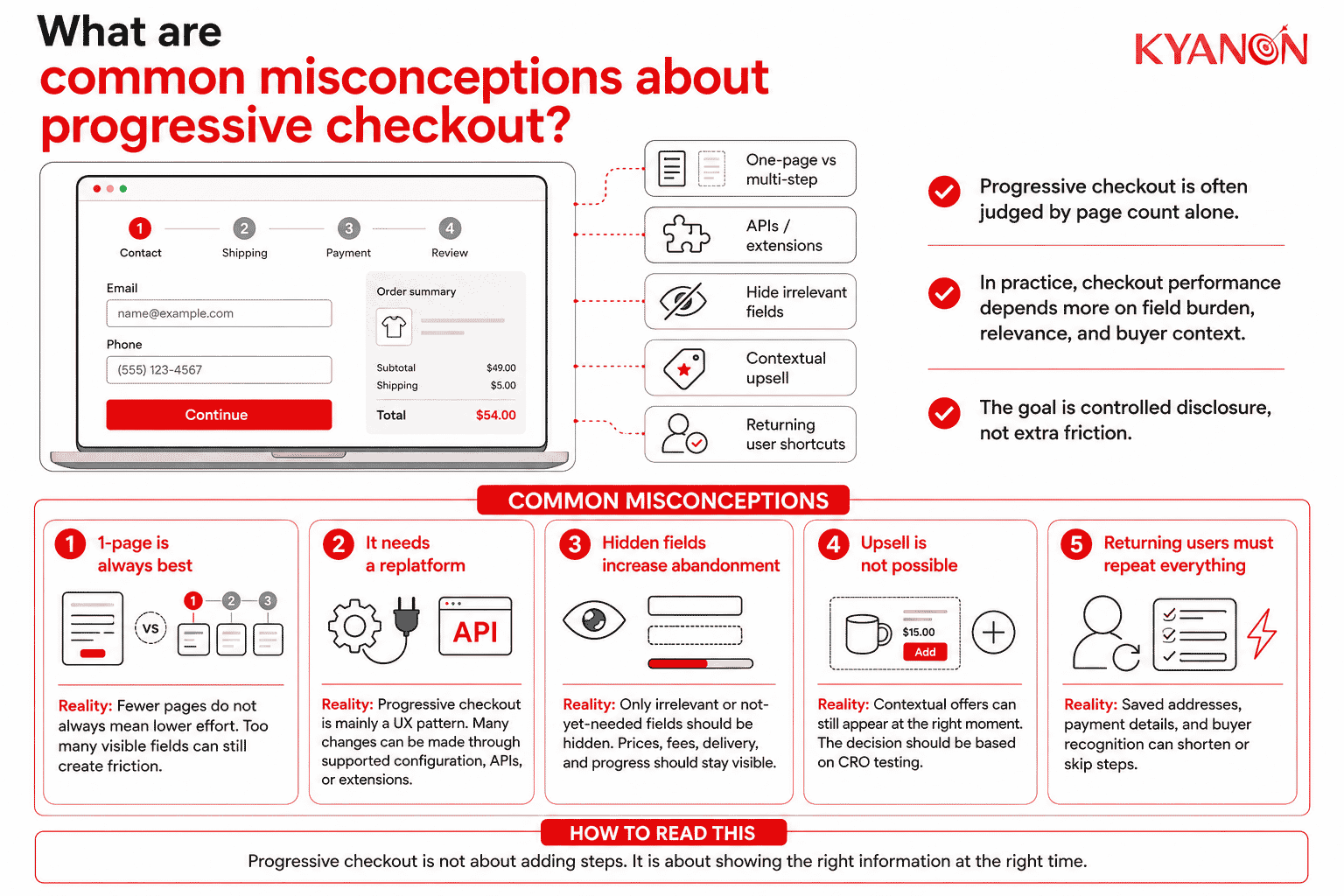
Progressive checkout is frequently misjudged because checkout performance depends on information burden, relevance, transparency, and buyer context, not simply on whether the transaction uses one page or several steps.
“The best checkout is always a one-page fast checkout.”
Reality: A smaller page count does not automatically mean a simpler checkout. Baymard’s research finds that the number of fields shoppers must manage matters more to checkout usability than the number of steps.
A one-page layout can work well when the transaction requires little information. When a checkout contains many address, fulfillment, payment, tax, or account fields, staged disclosure can reduce the amount the shopper must process at once.
For a Head of eCommerce, the decision should therefore be based on checkout effort and conversion data, not a KPI such as “minimum number of pages.”
“Changing to progressive checkout means an expensive replatform.”
Reality: Progressive checkout is primarily an experience and interaction pattern, so changing the checkout flow does not inherently require replacing the underlying commerce platform.
For example, Shopify lets merchants switch between one-page and three-page checkout layouts on the same platform. Its Checkout UI extensions can also add custom UI and workflows at defined points in the checkout process, although available customization depends on Shopify’s supported extension capabilities and plan requirements.
For a CTO, the architecture question is therefore whether the existing checkout layer exposes enough supported configuration, extension, and API capability, not whether progressive checkout automatically requires replatforming.
“Hiding fields behind steps will increase abandonment.”
Reality: Progressive checkout should hide irrelevant or not-yet-needed inputs, not essential information such as total price, fees, delivery commitments, or the shopper’s current progress.
Nielsen Norman Group recommends structuring complex forms to reduce cognitive load through staged or conditional disclosure, while Baymard finds that checkout field count has a greater impact on usability than the number of steps.
The objective is therefore controlled disclosure, not information concealment.
“You cannot cross-sell or upsell effectively in a progressive checkout.”
Reality: A progressive checkout architecture does not prevent contextual offers. Modern checkout extension models can place custom content or product offers at defined locations in the transaction flow; Shopify’s checkout extension framework, for example, supports custom UI and logic within checkout stages.
Whether an upsell should appear is a CRO decision. Offers should be tested against conversion and average order value rather than inserted simply because the technology permits them.
“Returning customers still have to click through every step.”
Reality: A progressive checkout does not require every shopper to receive the same sequence. Saved addresses, stored payment information, recognized customer state, and accelerated checkout can reduce or bypass redundant data entry.
Shopify’s accelerated checkout documentation states that saved payment and shipping information can be automatically filled when a returning customer checks out.
For technical accuracy, this behavior is better described as saved checkout data, buyer recognition, and accelerated checkout rather than assuming that every progressive checkout contains a separate “progressive profiling engine.”
How Kyanon Digital applies progressive checkout
Kyanon Digital applies progressive checkout as part of checkout UX and conversion-rate optimization within broader digital commerce implementations. Kyanon Digital’s digital commerce capability includes shopping cart and checkout as part of the connected commerce ecosystem, while its existing basket-abandonment approach explicitly includes progressive checkout architectures and CRO-focused UX improvements.
The approach can include:
- mapping checkout drop-off and form friction;
- restructuring contact, fulfillment, and payment stages;
- reducing or conditionally displaying unnecessary fields;
- supporting guest and returning-customer paths;
- integrating payment, shipping, pricing, and enterprise commerce systems;
- optimizing mobile checkout interaction; and
- validating changes through analytics and controlled experimentation.
The objective is not to impose a progressive flow on every commerce implementation. It is to determine whether staged disclosure can improve conversion while fitting the organization’s existing platform architecture, customer journey, implementation cost, and total cost of ownership.
→ Explore Kyanon Digital’s digital commerce services for commerce experience, checkout, platform, integration, and optimization capabilities.











 Create project brief with AI