
What is PWA commerce?
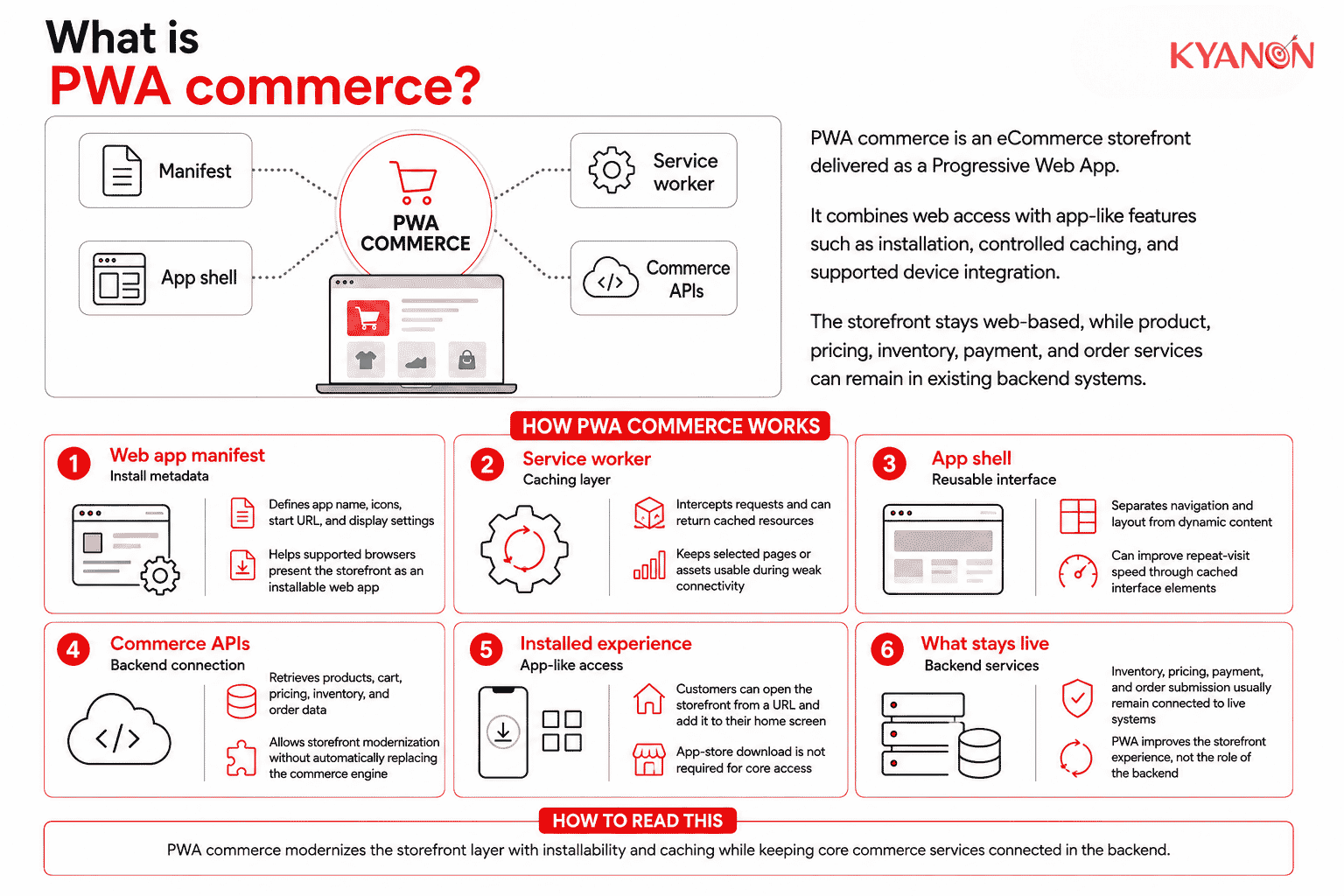
PWA commerce is an eCommerce storefront delivered as a Progressive Web App (PWA), combining normal web access with capabilities such as installation, controlled caching, offline fallback, and supported device integration.
Shopify describes a PWA as a web application that delivers an app-like experience within a browser, combining the accessibility of an eCommerce website with selected capabilities associated with native mobile apps.
Customers can access the storefront through a URL and, on supported devices, add it to their home screen. PWA commerce describes the storefront delivery model, not the underlying commerce platform, so product, pricing, inventory, payment, and order services can remain in existing backend systems.
How PWA commerce works
PWA commerce adds installability, caching, and progressively available browser capabilities to a web storefront while keeping commerce data and transactions connected to backend systems.
Four components commonly shape the architecture.
Web app manifest
A web app manifest is a JSON-based file containing information such as the application name, icons, start URL, and display preferences.
Supported browsers use this metadata when presenting an installed web application.
Service worker and caching
A service worker can intercept network requests and return cached resources instead of requesting every resource again from the network.
For commerce, selected product content, images, scripts, and interface resources can be cached, while current inventory, pricing, payment, and order submission can continue to rely on live backend services. The Service Worker specification explicitly provides fetch and storage mechanisms for offline-enabled web applications.
App shell architecture
An app shell separates reusable interface elements from dynamic content that is loaded separately. Frequently reused elements such as navigation and layout can be cached to improve perceived performance on repeat visits.
App shell architecture is a useful PWA pattern, not a mandatory requirement for every PWA storefront.
Commerce APIs
The storefront can retrieve products, cart information, customer data, pricing, inventory, and orders from commerce and enterprise systems through APIs.
This means organizations can modernize the storefront without automatically replacing the underlying commerce engine.

PWA commerce vs. native mobile commerce app
PWA commerce uses web technologies and web distribution, while native commerce applications are built around the capabilities and distribution model of mobile operating systems.
| Dimension | PWA commerce | Native mobile app |
Access | URL or installed PWA | Installed application |
| Distribution | Web-first; app store not required for core access | Usually distributed through app stores |
Codebase | Web frontend | Native or cross-platform application |
| Search visibility | Web URLs can be indexed | App screens are not standard web pages |
Updates | Web deployment | Typically follows an application release process |
| Offline support | Selective caching | Broader local capabilities possible |
Device integration | Depends on browser and OS APIs | Broader platform integration |
| Best fit | Web reach, mobile performance, repeat access | Deep device-specific experiences |
A PWA can support many mobile-commerce journeys, but it does not automatically replace a native application when deeper platform-specific capabilities are required.
When to consider PWA commerce
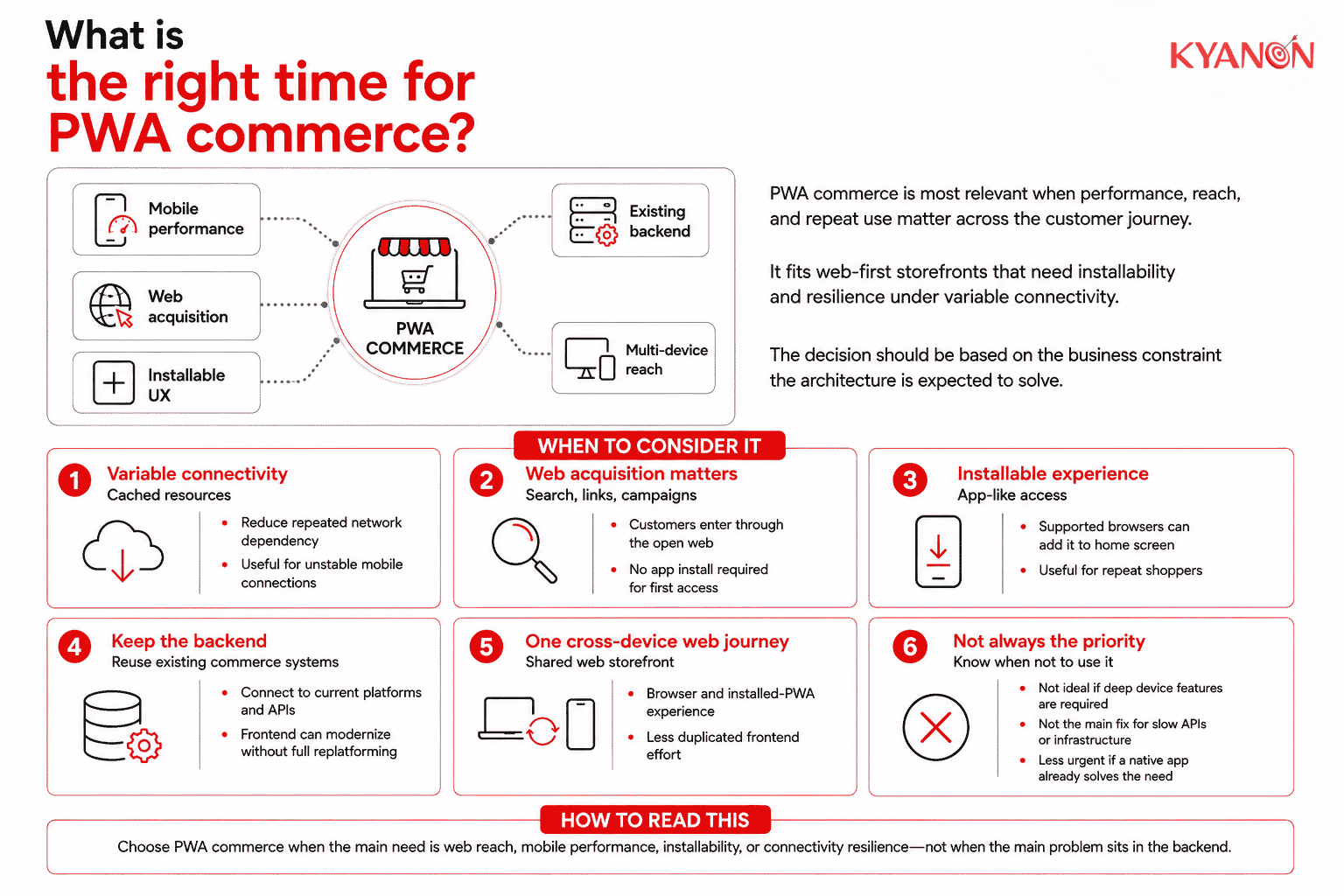
PWA commerce is most relevant when web acquisition, mobile performance, repeat visits, and resilience under variable connectivity are important to the customer journey.
Consider PWA commerce if:
- Mobile connectivity varies. Cached resources can reduce repeated network dependency.
- Web acquisition matters. Customers can enter through search, campaigns, links, or direct URLs.
- You want an installable web experience. Supported browsers can add the storefront to the customer’s device.
- You want to retain the existing commerce backend. The storefront can connect to current commerce and enterprise services through APIs.
- You want one web experience across devices. A common web frontend can support both browser and installed-PWA journeys.
It may not be the right priority if:
- The customer journey depends heavily on device functionality unavailable through target web browsers;
- Storefront performance issues mainly originate from slow APIs, integrations, or infrastructure; or
- An existing native application already meets the customer need without a clear additional PWA use case.
For a CTO or Head of eCommerce, the decision should start with which performance, reach, architecture, or TCO constraint the PWA is expected to address.
Why PWA commerce matters for eCommerce
PWA commerce gives organizations additional mechanisms to improve repeat-load performance, web reach, installability, and resilience without removing the storefront from the open web.
A 2026 analysis of 1.07 million eCommerce stores found that only 36% of the most-visited stores passed Core Web Vitals on mobile, compared with 64.7% of long-tail stores. The analysis used Google CrUX real-user field data from May 2026.
Key business implications include:
Capability | Business relevance |
Controlled caching | Can reduce repeated retrieval of selected storefront resources |
| Direct web access | Customers do not need an app-store download before visiting |
Installability | Repeat shoppers can launch the storefront from their device |
| Connectivity resilience | Previously cached content can remain available during interruptions |
Shared web frontend | Can reduce some duplication across browser and installed-web experiences |
| Search visibility | Public storefront URLs can remain crawlable and indexable |
These benefits are capabilities rather than guaranteed outcomes. JavaScript weight, media, third-party scripts, rendering, APIs, infrastructure, and cache strategy still determine actual performance and TCO.
Popular commerce platforms supporting PWA storefronts
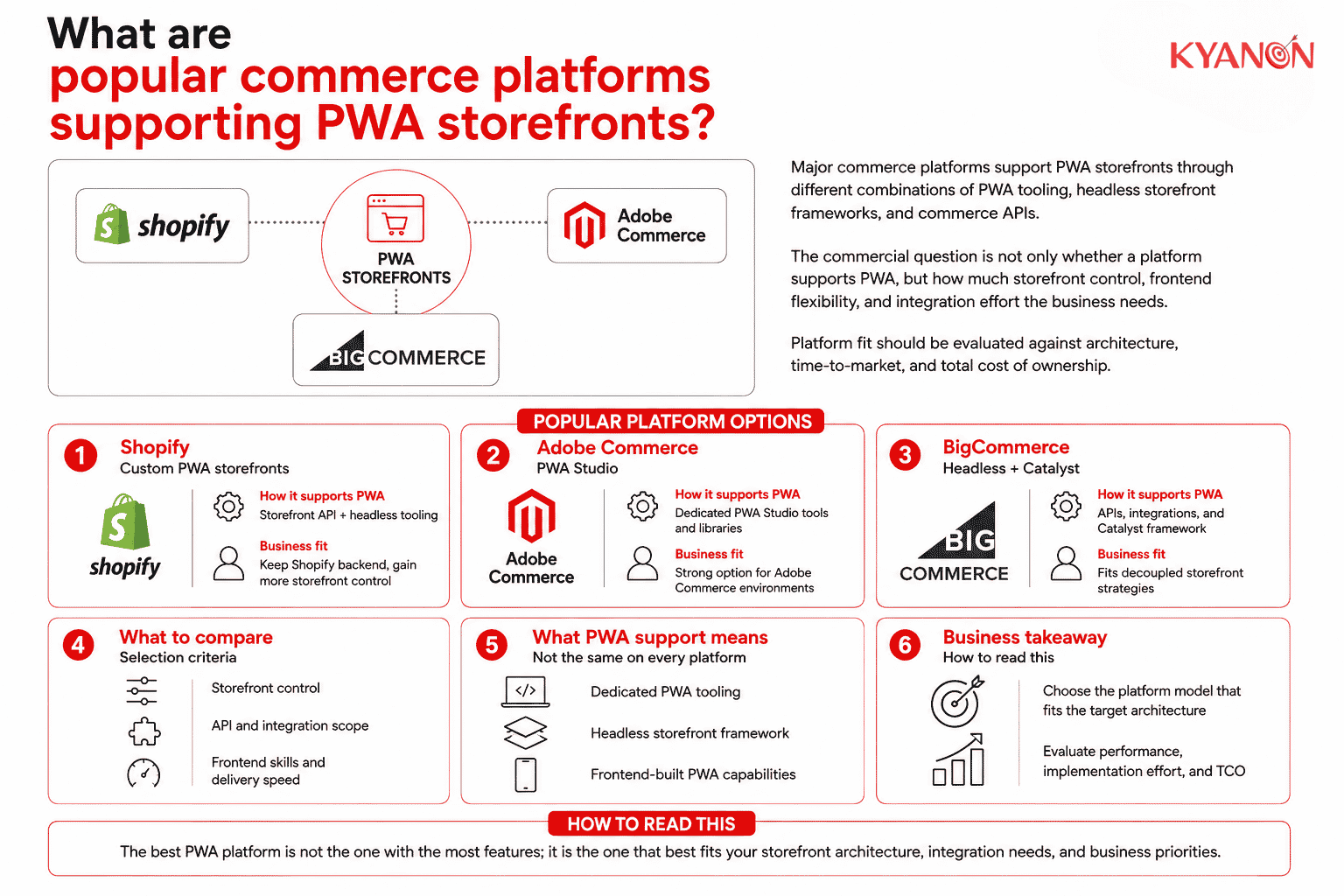
Major commerce platforms support PWA storefronts through different combinations of dedicated PWA tooling, headless storefront frameworks, and commerce APIs.
Platform | How it supports PWA commerce | Business consideration |
Shopify | Supports custom storefronts through its Storefront API and headless tooling, including Hydrogen; PWA capabilities can be implemented in the frontend. | Suitable when Shopify remains the commerce backend but the organization needs greater storefront control. |
Adobe Commerce / Magento Open Source | Adobe provides PWA Studio, a dedicated set of tools and libraries for developing and maintaining PWA storefronts. | Provides an established PWA-specific approach for Adobe Commerce environments. |
BigCommerce | Supports PWA development through headless architecture, Storefront APIs, integrations, and modern storefront frameworks such as Catalyst. | Suitable for organizations using BigCommerce as an API-driven commerce backend with a decoupled frontend. |
Common misconceptions about PWA commerce
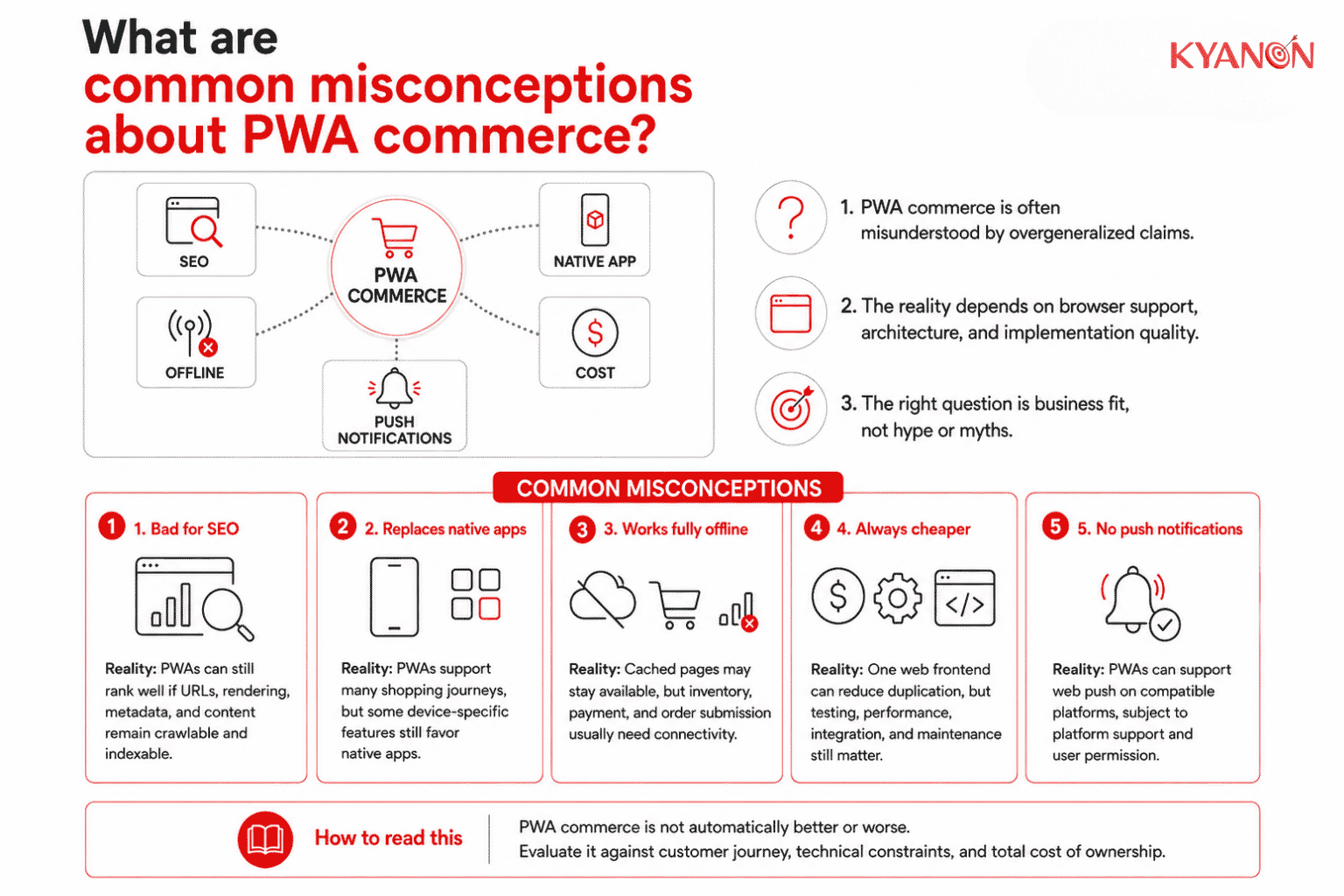
PWA commerce does not automatically guarantee better SEO, complete offline commerce, lower development cost, or replacement of a native application.
“PWAs are bad for SEO.”
Reality: PWA architecture is not inherently bad for SEO. Google crawls and renders JavaScript-powered pages and can index their content when URLs, resources, links, and rendered content remain accessible.
For a Head of eCommerce, the requirement should be crawlable URLs, accessible content, appropriate rendering, metadata, structured data, and performance, not simply avoiding PWA technology.
“A PWA completely replaces a native mobile app.”
Reality: PWAs can support many shopping journeys, but browser and operating-system capabilities still differ.
Native development remains relevant when the required experience depends on deeper platform-specific device integration.
“The entire store works offline.”
Reality: Service workers can make selected pages and assets available without a network connection, but PWA commerce is offline-capable rather than automatically fully offline.
Previously cached product information may remain accessible, while current inventory, payment authorization, and final order submission normally require backend connectivity.
“PWA development is always cheaper.”
Reality: A shared web frontend can reduce some duplicated development, but it does not eliminate browser testing, caching strategy, API integration, performance engineering, SEO, security, analytics, and maintenance.
For an IT Director, the relevant comparison is total cost of ownership, not simply the number of codebases.
“PWAs cannot send push notifications.”
Reality: PWAs can support Web Push on compatible platforms. Apple added Web Push for Home Screen web applications in iOS and iPadOS 16.4 and later expanded its web-app capabilities.
Push availability still depends on platform support and user permission.
How Kyanon Digital applies PWA commerce
Kyanon Digital applies PWA storefront development when organizations need a web-first commerce experience designed for mobile performance and variable network conditions.
Depending on the existing commerce environment, implementation can include:
- PWA storefront architecture;
- service-worker and caching strategy;
- server-side or hybrid rendering;
- Core Web Vitals optimization;
- commerce API integration;
- payment, inventory, OMS, loyalty, and enterprise integration; and
- SEO and analytics implementation.
Kyanon Digital’s digital commerce services cover eCommerce platforms, omnichannel commerce, loyalty, fulfillment, data, AI, and connected commerce modernization.
The objective is not to implement PWA as a frontend trend. The architecture should be evaluated against measurable requirements such as performance, conversion, time-to-market, implementation complexity, and TCO.
→ Explore Kyanon Digital’s digital commerce development and modernization services.

 Create project brief with AI