
What is 360-degree product view?
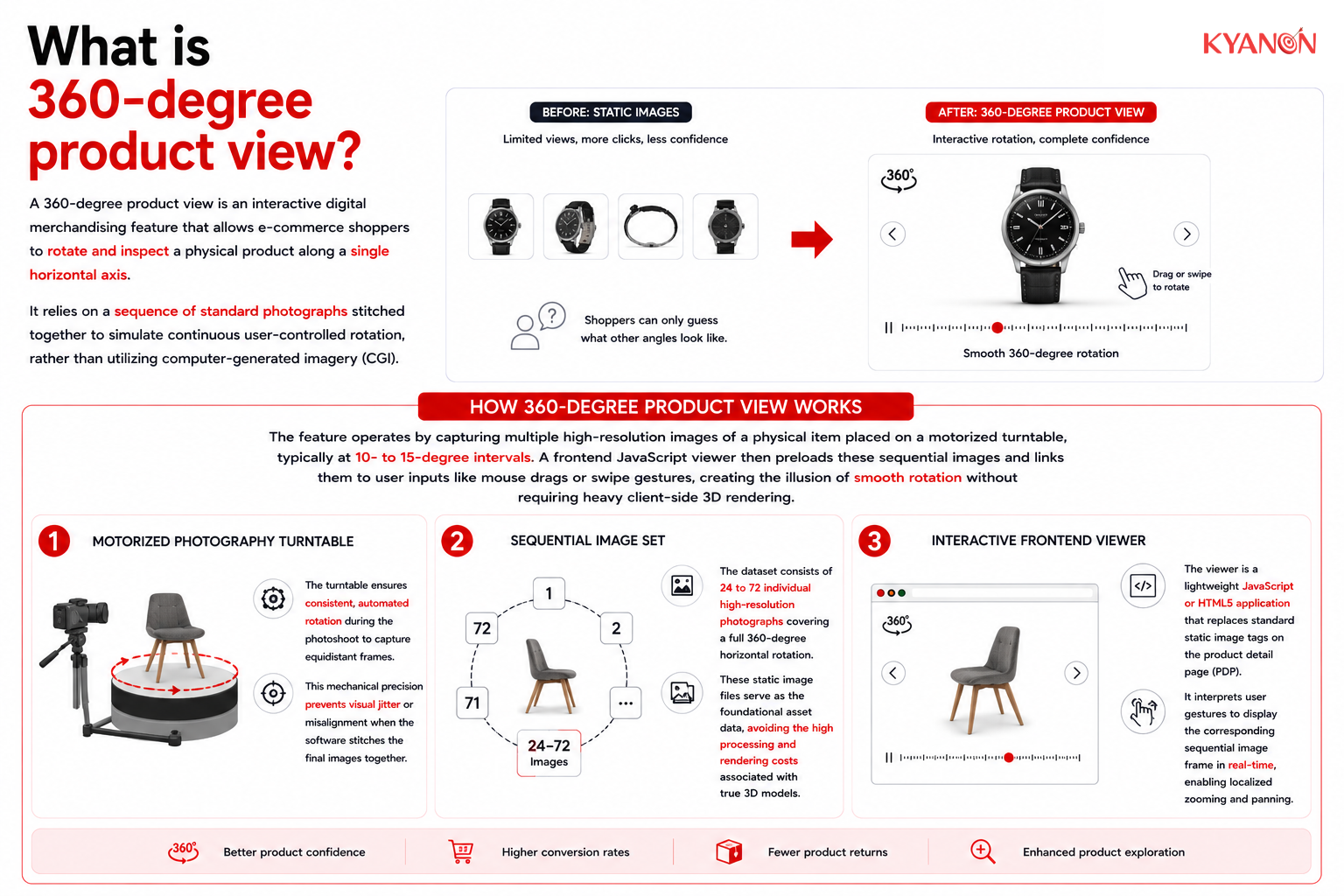
A 360-degree product view is an interactive digital merchandising feature that allows e-commerce shoppers to rotate and inspect a physical product along a single horizontal axis. It relies on a sequence of standard photographs stitched together to simulate continuous user-controlled rotation, rather than utilizing computer-generated imagery (CGI).
How 360-degree product view works
The feature operates by capturing multiple high-resolution images of a physical item placed on a motorized turntable, typically at 10- to 15-degree intervals. A frontend JavaScript viewer then preloads these sequential images and links them to user inputs like mouse drags or swipe gestures, creating the illusion of smooth rotation without requiring heavy client-side 3D rendering.
Motorized photography turntable
The turntable ensures consistent, automated rotation during the photoshoot to capture equidistant frames. This mechanical precision prevents visual jitter or misalignment when the software stitches the final images together.
Sequential image set
The dataset consists of 24 to 72 individual high-resolution photographs covering a full 360-degree horizontal rotation. These static image files serve as the foundational asset data, avoiding the high processing and rendering costs associated with true 3D models.
Interactive frontend viewer
The viewer is a lightweight JavaScript or HTML5 application that replaces standard static image tags on the product detail page (PDP). It interprets user gestures to display the corresponding sequential image frame in real-time, enabling localized zooming and panning.

360-degree product view vs True 3D models
Both approaches enhance visual merchandising on product detail pages, but they differ fundamentally in asset creation methodology and interactive freedom.
Dimension | 360-Degree Product View | True 3D Models |
| Asset creation method | Photographic capture of physical items | Computer-generated imagery (CAD/CGI) |
Interactive flexibility | Fixed to a single horizontal axis | Unrestricted rotation across all X, Y, and Z axes |
| Handling product variants | Requires a separate shoot for each physical color/variant | Dynamic rendering allows digital component/color swapping |
Hardware requirements | Standard camera, lighting, and a turntable | Specialized 3D rendering software and modeling expertise |
| Upfront complexity | Low to medium | High |
When to consider 360-degree product view
Consider 360-Degree Product View if:
- Your product detail pages suffer from high cart abandonment rates due to shoppers lacking confidence in material textures or build quality.
- Your reverse logistics costs are escalating because customers frequently return physical items that do not match their visual expectations.
- Your catalog consists of highly detailed physical goods, such as consumer electronics or footwear, where a single static image fails to convey structural depth.
It may not be the right priority if:
- Your inventory is highly customizable with thousands of micro-variations, making physical photoshoots financially unviable compared to programmatic 3D rendering.
Why 360-degree product view matters for E-commerce retailers
A 360-degree product view helps e-commerce retailers provide a more immersive and informative shopping experience by allowing customers to inspect products from multiple angles, reducing uncertainty and improving product understanding before purchase. This interactive visualization can strengthen customer confidence, particularly for products where design, shape, and physical details influence buying decisions.
Research from the Baymard Institute shows that 360-degree views can enhance product visualization, while recent academic research also supports the value of extended-reality product presentations in online retail. However, 360-degree views should complement, not replace high-quality static product images.
Common misconceptions
Common misconceptions of 360-Degree Product View
It offers true 3D flexibility for our users
Reality: Standard 360-degree viewing locks the user onto one horizontal plane, meaning users cannot flip the item upside down to inspect the top or bottom. True 3D models allow unrestricted rotation across all axes but require computer-generated imagery (CGI) instead of simple photography.
It handles our product color variations automatically
Reality: Photography-based 360 spins capture a specific, physical object, so if a jacket comes in five colors, all five variants must be shot individually. Digital color-swapping or component changes are features of 3D CAD rendering, not traditional 360-degree photo setups.
It works exactly like embedding a video
Reality: A video is a passive, linear playback file that rolls automatically without input. An interactive 360 view gives control directly to the user, allowing shoppers to choose when to drag, spin, pause, and zoom in on specific textures or stitch details.
It is too expensive and complex for mid-market catalogs
Reality: Automated photography software and budget-friendly turntables have democratized the process for businesses of all sizes. Off-the-shelf plugins easily host and render the interactive spins without the need for custom coding.
How Kyanon Digital applies 360-degree product view
Kyanon Digital implements 360-degree product view features as part of rich Product Detail Page (PDP) builds for retail and consumer electronics clients across Vietnam, Singapore, Malaysia, and ANZ. Our approach focuses on measurable outcomes by ensuring these frontend assets integrate efficiently with existing Product Information Management (PIM) systems, reducing time-to-market while keeping total cost of ownership (TCO) low.
Explore our services:

 Create project brief with AI