
What is an agent desktop?
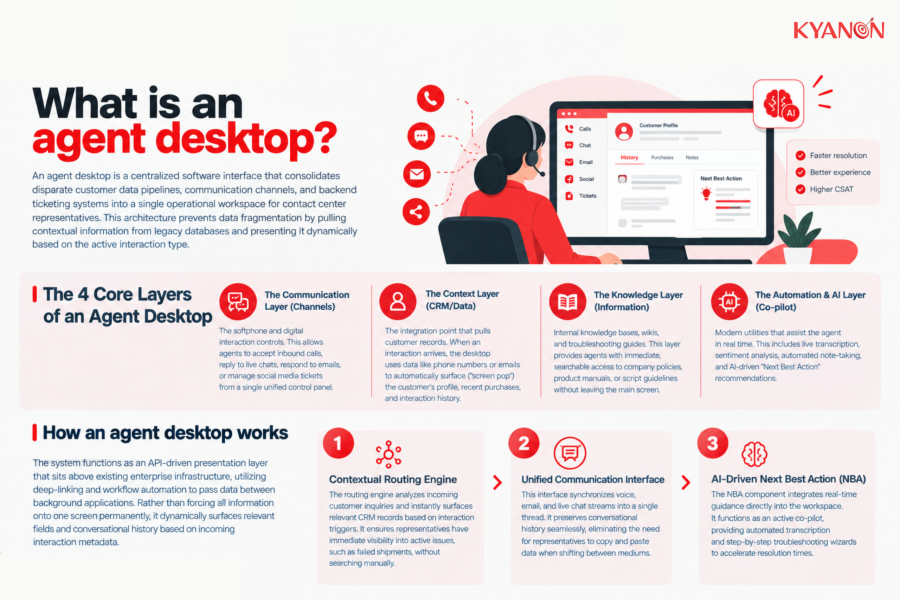
An agent desktop is a centralized software interface that consolidates disparate customer data pipelines, communication channels, and backend ticketing systems into a single operational workspace for contact center representatives. This architecture prevents data fragmentation by pulling contextual information from legacy databases and presenting it dynamically based on the active interaction type.
The 4 core layers of an agent desktop
- The Communication Layer (Channels): The softphone and digital interaction controls. This allows agents to accept inbound calls, reply to live chats, respond to emails, or manage social media tickets from a single unified control panel.
- The Context Layer (CRM/Data): The integration point that pulls customer records. When an interaction arrives, the desktop uses data like phone numbers or emails to automatically surface (“screen pop”) the customer’s profile, recent purchases, and interaction history.
- The Knowledge Layer (Information): Internal knowledge bases, wikis, and troubleshooting guides. This layer provides agents with immediate, searchable access to company policies, product manuals, or script guidelines without leaving the main screen.
- The Automation & AI Layer (Co-pilot): Modern utilities that assist the agent in real time. This includes live transcription, sentiment analysis, automated note-taking, and AI-driven “Next Best Action” recommendations.

How an agent desktop works
The system functions as an API-driven presentation layer that sits above existing enterprise infrastructure, utilizing deep-linking and workflow automation to pass data between background applications. Rather than forcing all information onto one screen permanently, it dynamically surfaces relevant fields and conversational history based on incoming interaction metadata.
Contextual Routing Engine
The routing engine analyzes incoming customer inquiries and instantly surfaces relevant CRM records based on interaction triggers. It ensures representatives have immediate visibility into active issues, such as failed shipments, without searching manually.
Unified Communication Interface
This interface synchronizes voice, email, and live chat streams into a single thread. It preserves conversational history seamlessly, eliminating the need for representatives to copy and paste data when shifting between mediums.
AI-Driven Next Best Action (NBA)
The NBA component integrates real-time guidance directly into the workspace. It functions as an active co-pilot, providing automated transcription and step-by-step troubleshooting wizards to accelerate resolution times.
Agent Desktop vs Legacy CRM Interface
Both tools manage customer data, but differ significantly in interaction handling and workflow automation.
Dimension | Agent Desktop | Legacy CRM Interface |
| System architecture | API-driven presentation layer | Monolithic database structure |
Interaction handling | Real-time omnichannel sync | Static, manual record entry |
| Channel context | Preserved across mediums | Siloed by communication type |
Primary function | Action-oriented interaction | Passive data logging |
| Workflow automation | High (Deep-linking, NBA) | Low (Requires manual tab switching) |
When to consider an agent desktop
Consider an agent desktop if:
- Your representatives must manually copy and paste customer information between live chat tools and billing systems during active calls.
- High average handle times (AHT) are directly correlated to representatives searching through outdated PDF manuals or siloed internal knowledge bases.
- You are planning to deploy AI-driven co-pilots, but your current desktop architecture lacks the API extensibility to integrate real-time transcription.
It may not be the right priority if:
- Your organization relies on automated, low-touch self-service portals where human intervention is strictly limited to isolated tier-3 escalations handled by dedicated engineers.
Why an agent desktop matters for enterprise contact centers
Fragmented operational workspaces directly increase average handle time (AHT) by forcing representatives to navigate redundant authentication protocols across multiple disconnected databases. Implementing a unified interface eliminates these structural bottlenecks, reducing cognitive load and decreasing total cost of ownership (TCO) through consolidated licensing.
Salesforce’s 2025 State of Service found that agents using AI spend 20% less time on routine cases, freeing an estimated four hours per week for more complex work. A well-designed agent desktop can consolidate these workflows into one working environment, helping enterprises improve agent capacity and cost efficiency without relying only on additional headcount.
Common misconceptions
We need to cram every piece of available customer data onto a single screen to give our team a complete 360-view
Reality: Flooding a monitor with overwhelming, non-contextual data causes severe cognitive overload. An agent dealing with an angry caller needs immediate visibility into the active issue-like a broken app feature-not a sprawling log of every marketing email the customer opened over the past year.
Buying a modern CRM means our team finally has a true single pane of glass and will never switch tabs again
Reality: In most enterprise environments, a single screen is an illusion. True desktop optimization is not about forcing everything into one window; it relies on seamless deep-linking and workflow automation that passes data between background systems automatically.
We should customize the desktop layout based on what makes reporting easier for our executive management
Reality: Desktops built without direct user input are notoriously clunky and feature rigid workflows that restrict natural conversation. Every extra click forced by poor layout design multiplies Average Handle Time (AHT) across thousands of calls and accelerates fatigue.
How Kyanon Digital applies agent desktop
Kyanon Digital builds and integrates agent desktop solutions for enterprise contact center clients across Vietnam, Singapore, Thailand, ANZ, and Malaysia. Our engineering teams connect disparate CRM architectures, ticketing frameworks, and internal knowledge bases into a structured, unified agent workspace. We focus on practical implementation over theoretical consulting, optimizing digital touchpoints to ensure measurable reductions in TCO and accelerated time-to-market for modernized customer service operations.
Explore our services:

 Create project brief with AI